Exercise BB3 · building blocks · comparator
4063 4-bit magnitude comparator
Two 4-bit numbers from eight buttons, one chip, and a traffic light for the answer: green when A is greater than B, yellow when they are equal, red when A is less.
1What it is and why it matters
What it does. Buttons A3–A0 give the number A and buttons B3–B0 the number B, each from 0 to 15. The 4063 has three outputs, A>B, A=B and A<B, and exactly one of them is 1. They drive the traffic-light module plugged into the board: green for A>B, yellow for A=B, red for A<B.
How it works. The comparator works like a person comparing two numbers: it looks at the highest bits first. If A3 and B3 differ, they decide; if they are equal, A2 and B2 decide, and so on down to A0 and B0. Only when all four pairs are equal is A=B. Three more inputs, the cascading inputs, let a second comparator below this one decide the tie; with one chip they are wired to say “equal”.
Where it is used. Every if (a < b) in a program runs on a comparator. Processors compare
in the branch unit; a timer compares a counter with a limit; an arbiter compares priorities; a sorting network is
built of comparators. In the course the 4063 comes back in M12, where it compares a binary counter with a Johnson
counter, and in P7, where a two-flip-flop state machine compares numbers bit by bit.
Why learn it.
- Comparison is arithmetic too: A<B is the borrow of the subtraction A − B.
- The cascading inputs show how small blocks build big ones: two 4063s make an 8-bit comparator.
- The three outputs are a one-hot code: exactly one is 1. One-hot codes come back in decoders (BB5) and state machines.
2The key elements: comparing from the top bit
| A | A3…A0 | B | B3…B0 | The first bit from the left that differs | Light |
|---|---|---|---|---|---|
| 5 | 0101 | 3 | 0011 | bit 2: A2 = 1, B2 = 0 | green |
| 3 | 0011 | 5 | 0101 | bit 2: A2 = 0, B2 = 1 | red |
| 9 | 1001 | 9 | 1001 | all bits equal | yellow |
| 8 | 1000 | 7 | 0111 | bit 3: A3 = 1, B3 = 0 | green |
| 4 | 0100 | 12 | 1100 | bit 3: A3 = 0, B3 = 1 | red |
| 13 | 1101 | 12 | 1100 | bit 0: A0 = 1, B0 = 0 | green |
| 15 | 1111 | 15 | 1111 | all bits equal | yellow |
In each row the first bit from the left where A and B differ decides; the bits below it do not matter. 13 and 12 differ only in bit 0, so the comparator has to look at all four bits.
Waveforms
tb.sv in Icarus Verilog: A = 12 and B counting from 0 to 15.
The light is green while B < 12, yellow at B = 12 and red above. · SVG · PNG3Parts
| Part | In this circuit | Qty | Price | Supplier |
|---|---|---|---|---|
| CD4063 | 4-bit magnitude comparator | 1 | $0.30 | Futurlec (futurlec.com) |
| Button modules | A3-A0 and B3-B0; the first pack of five | 5 | $0.66 / pack | aliexpress.us |
| Button modules | 3 more from the second pack | 3 | $2.03 / pack | aliexpress.us |
| Traffic-light LED module, 5 V | A>B green, A=B yellow, A<B red; plugged into the board; resistors built in | 1 | $0.40 | aliexpress.us |
| Breadboard, 830 points | 1 | $3.00 | amazon.com | |
| Breadboard power module | 5 V on the rails | 1 | $1.00 | aliexpress.us |
| USB-to-DC cable, 9 V | powers the module from a USB charger | 1 | $1.17 | aliexpress.us |
| Pre-cut jumper wires | 10 wires on the board (or male-male Dupont jumpers) | 10 | $11.95 / pack | jameco.com |
| Male-female Dupont jumpers | 24 leads to the buttons | 24 | $1.30 / pack | aliexpress.us |
Prices from the LSSK components sheet; the 4063 is in the Comprehensive kit.
4The chip, pin by pin
The chips are CMOS 4000B series: they work from 3 to 18 V, here from the 5 V of the power module. Every input must be connected to something, because a CMOS input left open picks up noise and can switch at random. The drawings show each chip from above with the notch on the left, as in the datasheet: pin 1 at the bottom left, pins numbered counter-clockwise. Blue arrows are inputs, orange arrows are outputs.
4063: 4-bit magnitude comparator
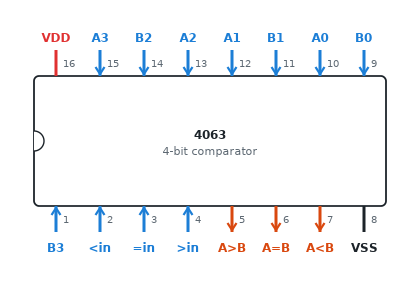
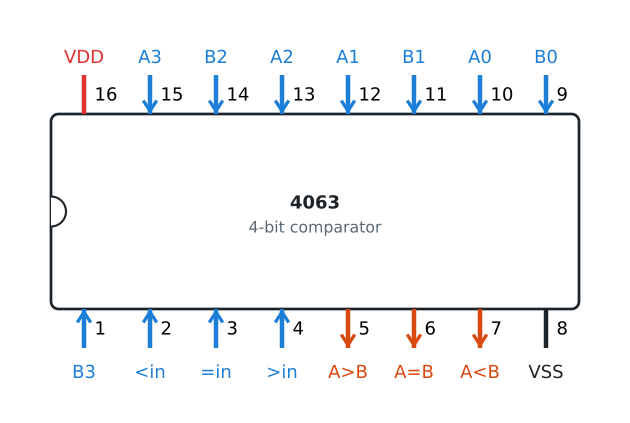
A3–A0 are on pins 15, 13, 12 and 10, B2–B0 on pins 14, 11 and 9, all on the top row; B3 is pin 1 of the bottom row. The outputs A>B, A=B and A<B are pins 5, 6 and 7.
Cascading inputs. Pins 2, 3 and 4 take the result of a less significant comparator: A<B, A=B and A>B in. When A = B the outputs copy them. A single chip has nothing below it, so A=B in (pin 3) goes to +5V and the other two to GND: “the bits below are equal”.
| Pin | Name | Direction | Function | In this circuit |
|---|---|---|---|---|
| 1 | B3 | input | number B, bit 3 (weight 8) | B3 |
| 2 | A<B IN | input | cascade input A<B: 0 for a single chip | GND |
| 3 | A=B IN | input | cascade input A=B: 1 for a single chip | +5V |
| 4 | A>B IN | input | cascade input A>B: 0 for a single chip | GND |
| 5 | A>B OUT | output | 1 when A > B | A>B |
| 6 | A=B OUT | output | 1 when A = B (and the cascade input A=B is 1) | A=B |
| 7 | A<B OUT | output | 1 when A < B | A<B |
| 8 | VSS | power | ground, 0 V | GND |
| 9 | B0 | input | number B, bit 0 (weight 1) | B0 |
| 10 | A0 | input | number A, bit 0 (weight 1) | A0 |
| 11 | B1 | input | number B, bit 1 (weight 2) | B1 |
| 12 | A1 | input | number A, bit 1 (weight 2) | A1 |
| 13 | A2 | input | number A, bit 2 (weight 4) | A2 |
| 14 | B2 | input | number B, bit 2 (weight 4) | B2 |
| 15 | A3 | input | number A, bit 3 (weight 8) | A3 |
| 16 | VDD | power | supply, +5 V (3 to 18 V allowed) | +5V |
The traffic-light module
Three LEDs with their resistors and four pins, printed G, Y, R and GND. It is plugged straight into the breadboard, pins in row f of four neighbouring columns; its body stands over the top half of those columns.
5Schematic 1: the comparator as a block
comparator.sv describes,
bit by bit from the top. The cascading inputs are tied for a single chip. · SVG · PNG6Schematic 2: connections
| Net | From | To | Wire |
|---|---|---|---|
| A3 | button A3, OUT | 4063 15 (A3) | M-F |
| A2 | button A2, OUT | 4063 13 (A2) | M-F |
| A1 | button A1, OUT | 4063 12 (A1) | M-F |
| A0 | button A0, OUT | 4063 10 (A0) | M-F |
| B3 | button B3, OUT | 4063 1 (B3) | M-F, M-M |
| B2 | button B2, OUT | 4063 14 (B2) | M-F |
| B1 | button B1, OUT | 4063 11 (B1) | M-F |
| B0 | button B0, OUT | 4063 9 (B0) | M-F |
| A>B | 4063 5 (A>B) | traffic light, G | M-M |
| A=B | 4063 6 (A=B) | traffic light, Y | M-M |
| A<B | 4063 7 (A<B) | traffic light, R | M-M |
| +5V | +5V | 4063 16 (VDD), 4063 3 (=in) | |
| GND | GND | 4063 8 (VSS), traffic light, GND, 4063 2 (<in), 4063 4 (>in) |
7Schematic 3: the breadboard
Build it step by step
- Do the getting-started steps first: how the breadboard is connected inside, the power module with both jumpers on 5 V, how a chip sits across the gap.
- Insert the chips across the gap, notch to the left: the 4063 with pin 1 in hole 8f. Read the numbers on the chips: many look alike.
- Plug the traffic-light module into holes 18f to 21f, G in 18f and GND in 21f, lamps facing you.
- Power: for each chip a red wire from its VDD pin (14, or 16 on a 16-pin chip) to the + rail and a black wire from its VSS pin (7 or 8) to the − rail, each to the rail on its own side of the gap. Make sure no wire touches + and − at the same time.
- Also a black wire from column 21, the GND pin of the traffic light, to the bottom − rail.
- The cascading inputs: pin 2 (column 9) to the bottom − rail, pin 3 (column 10) to the bottom + rail, pin 4 (column 11) to the bottom − rail.
- The outputs: pins 5, 6 and 7 (columns 12–14) to G, Y and R of the traffic light (columns 18–20). And one wire brings B3 from pin 1 (column 8, bottom half) up to column 7 of the top half, where its button lands.
- With the power off, the buttons: + to the top + rail, − to the top − rail and OUT to the A or B pin.
- Turn the power on.
Wiring checklist
| # | Net | From | To | |
|---|---|---|---|---|
| Power (red to +, black to −) · 3 wires | ||||
| 1 | +5V | 8a (4063 pin 16, VDD) | top + rail, column 8 | |
| 2 | GND | 15j (4063 pin 8, VSS) | bottom − rail, column 15 | |
| 3 | GND | 21j (traffic light, GND) | bottom − rail, column 21 | |
| Fixed inputs: CMOS inputs must not float · 3 wires | ||||
| 4 | GND | 9j (4063 pin 2, <in) | bottom − rail, column 9 | |
| 5 | +5V | 10j (4063 pin 3, =in) | bottom + rail, column 10 | |
| 6 | GND | 11j (4063 pin 4, >in) | bottom − rail, column 11 | |
| Signal wires · 4 wires | ||||
| 7 | B3 | 8g (4063 pin 1, B3) | 7e | |
| 8 | A>B | 12g (4063 pin 5, A>B) | 18g (traffic light, G) | |
| 9 | A=B | 13g (4063 pin 6, A=B) | 19g (traffic light, Y) | |
| 10 | A<B | 14h (4063 pin 7, A<B) | 20h (traffic light, R) | |
| Modules on male-female jumpers · 24 wires | ||||
| 11 | +5V | button A3, + | top + rail, column 5 | |
| 12 | A3 | button A3, OUT | 9a (4063 pin 15, A3) | |
| 13 | GND | button A3, − | top − rail, column 7 | |
| 14 | +5V | button A2, + | top + rail, column 10 | |
| 15 | A2 | button A2, OUT | 11a (4063 pin 13, A2) | |
| 16 | GND | button A2, − | top − rail, column 12 | |
| 17 | +5V | button A1, + | top + rail, column 15 | |
| 18 | A1 | button A1, OUT | 12a (4063 pin 12, A1) | |
| 19 | GND | button A1, − | top − rail, column 17 | |
| 20 | +5V | button A0, + | top + rail, column 20 | |
| 21 | A0 | button A0, OUT | 14a (4063 pin 10, A0) | |
| 22 | GND | button A0, − | top − rail, column 22 | |
| 23 | +5V | button B3, + | top + rail, column 25 | |
| 24 | B3 | button B3, OUT | 7a | |
| 25 | GND | button B3, − | top − rail, column 27 | |
| 26 | +5V | button B2, + | top + rail, column 30 | |
| 27 | B2 | button B2, OUT | 10a (4063 pin 14, B2) | |
| 28 | GND | button B2, − | top − rail, column 32 | |
| 29 | +5V | button B1, + | top + rail, column 35 | |
| 30 | B1 | button B1, OUT | 13a (4063 pin 11, B1) | |
| 31 | GND | button B1, − | top − rail, column 37 | |
| 32 | +5V | button B0, + | top + rail, column 40 | |
| 33 | B0 | button B0, OUT | 15a (4063 pin 9, B0) | |
| 34 | GND | button B0, − | top − rail, column 42 | |
Test it
- No button pressed: 0 = 0, yellow.
- Press A0: green. Press B0 as well: yellow again. Now press B1 too: red, because B = 3 > A = 1.
- Press A3 alone against B2, B1 and B0 together: green, 8 > 7. The top bit decides.
- Exactly one lamp is lit at any time.
If it does not work: two lamps lit, or none, usually means a cascading input is wired wrong: pin 3 must be at +5V and pins 2 and 4 at GND. A wrong answer for one bit only points to its button lead: the A and B pins take turns on the top row and are easy to swap.
8SystemVerilog: the generic design
comparator.sv describes the comparison as a person does it: a loop from the top bit down, where the
first bit that differs sets A>B or A<B. It is synthesizable: the loop becomes four stages of gates.
// Exercise BB3: a 4-bit magnitude comparator, like the 4063.
//
// Generic version that matches schematic 1, not tied to any chip.  It
// compares A and B the way a person does: from the most significant bit
// down, the first bit where they differ decides.  Synthesizable.

module comparator
(
    input  logic [3:0] a,
    input  logic [3:0] b,

    output logic       a_gt_b,
    output logic       a_eq_b,
    output logic       a_lt_b
);

    always_comb
    begin
        a_gt_b = 1'b0;
        a_lt_b = 1'b0;

        // The loop is unrolled by synthesis into four stages of gates.
        // Once one output is 1, the lower bits no longer matter.

        for (int i = 3; i >= 0; i --)
            if (~ a_gt_b & ~ a_lt_b)
            begin
                a_gt_b =   a [i] & ~ b [i];
                a_lt_b = ~ a [i] &   b [i];
            end
    end

    assign a_eq_b = ~ a_gt_b & ~ a_lt_b;

endmodule
The loop runs inside always_comb: it is not executed at run time but unrolled by synthesis into a
circuit. In a real design you would simply write a > b; the testbench does exactly that.
9SystemVerilog model of the chip
One module per chip, with ports named as in the datasheet and the pin number of each port in a comment. The models leave out the power pins: in SystemVerilog a wire simply has the value 0 or 1.
// CD4063B: 4-bit magnitude comparator, pin-compatible with the 7485.
//
// Ports in pin order, named as in the datasheet.  The power pins, VSS (8)
// and VDD (16), are left out.  Synthesizable.
//
// When the two words differ, A>B or A<B is 1.  When they are equal, the
// outputs copy the cascading inputs, which come from the next less
// significant comparator.  A single chip gets A<B = 0, A=B = 1, A>B = 0.

module cd4063
(
    input  logic b3,      // Pin 1
    input  logic lt_in,   // Pin 2:  cascading input A<B
    input  logic eq_in,   // Pin 3:  cascading input A=B
    input  logic gt_in,   // Pin 4:  cascading input A>B
    output logic gt_out,  // Pin 5:  A>B
    output logic eq_out,  // Pin 6:  A=B
    output logic lt_out,  // Pin 7:  A<B
                          // Pin 8:  VSS
    input  logic b0,      // Pin 9
    input  logic a0,      // Pin 10
    input  logic b1,      // Pin 11
    input  logic a1,      // Pin 12
    input  logic a2,      // Pin 13
    input  logic b2,      // Pin 14
    input  logic a3       // Pin 15
                          // Pin 16: VDD
);

    wire [3:0] a = { a3, a2, a1, a0 };
    wire [3:0] b = { b3, b2, b1, b0 };

    assign gt_out = a > b | a == b & gt_in;
    assign lt_out = a < b | a == b & lt_in;
    assign eq_out =         a == b & eq_in;

endmodule
10SystemVerilog: the chip-level design
comparator_chips.sv connects the chip models exactly as schematic 2 and the breadboard connect
the chips, with the same ports as comparator.sv. Unused inputs are tied to vdd or gnd
as on the breadboard, and unused outputs go to wires named unused_…. The file is generated from the
breadboard wire list after a pin-level check of that list, so the code, the drawings and the checklist cannot
disagree.
// Exercise BB3, chip-level version: the chips and wires of schematic 2 and
// of the breadboard.  Same ports as comparator.sv.
//
// Generated by tools/bb_lib.py from the checked breadboard wire list;
// change the layout in tools/bb_bb3.py, not this file.  Synthesizable.

module comparator_chips
(
    input  logic [3:0] a,
    input  logic [3:0] b,
    output logic       a_gt_b,
    output logic       a_eq_b,
    output logic       a_lt_b
);

    // The power rails of the breadboard, for tied-off inputs

    wire gnd = 1'b0;
    wire vdd = 1'b1;

    //------------------------------------------------------------------------

    // U1: CD4063 4-bit magnitude comparator, pin 1 in column 8

    cd4063 i_u1
    (
        .b3     ( b [3]  ),  // Pin 1 <- button B3
        .lt_in  ( gnd    ),  // Pin 2 <- GND
        .eq_in  ( vdd    ),  // Pin 3 <- +5V
        .gt_in  ( gnd    ),  // Pin 4 <- GND
        .gt_out ( a_gt_b ),  // Pin 5 -> A>B
        .eq_out ( a_eq_b ),  // Pin 6 -> A=B
        .lt_out ( a_lt_b ),  // Pin 7 -> A<B
        .b0     ( b [0]  ),  // Pin 9 <- button B0
        .a0     ( a [0]  ),  // Pin 10 <- button A0
        .b1     ( b [1]  ),  // Pin 11 <- button B1
        .a1     ( a [1]  ),  // Pin 12 <- button A1
        .a2     ( a [2]  ),  // Pin 13 <- button A2
        .b2     ( b [2]  ),  // Pin 14 <- button B2
        .a3     ( a [3]  )   // Pin 15 <- button A3
    );

endmodule
11Testbench and simulation scripts
tb.sv runs both designs side by side and compares them with a reference model, the comparison of
two integers with >, == and <. The circuit has no clock, but the
testbench has one, like the testbenches of Basics-Graphics-Music: it sets A and B right after a rising edge and checks
the outputs at the next one. It tries all 256 pairs twice, counting up and in Gray code order, and prints
PASS only if both designs match every time and every pair was seen.
tb.sv156 lines · show the codefile
// Testbench for exercise BB3.
//
// Runs the generic design (comparator.sv) and the chip-level design
// (comparator_chips.sv) side by side and compares both with
// a comparison of two integers.  Works with Icarus Verilog, Verilator (--binary)
// and Questa.
//
// The circuit has no clock, but like the testbenches of Basics-Graphics-Music
// this one drives and checks signals only at rising edges of its own clock:
// it changes the inputs after one edge and checks the outputs at the next.
// It tries all 256 input combinations twice: counting up, and then in
// Gray code order, where one input changes at a time, as when a student
// presses or releases one button.

// Time units.  The design files have none: Yosys does not accept timeunit
// and timeprecision, and the Tiny Tapeout template sets `timescale 1ns / 1ps
// in its own testbench.  This line sets the same units here and for the
// design files compiled after it, so tb.sv comes first in the file list.

`timescale 1ns / 1ps

module tb;

    logic clk;

    logic [3:0] a;
    logic [3:0] b;

    wire  a_gt_b, a_gt_b_chips;
    wire  a_eq_b, a_eq_b_chips;
    wire  a_lt_b, a_lt_b_chips;

    comparator i_generic
    (
        .a      ( a      ),
        .b      ( b      ),
        .a_gt_b ( a_gt_b ),
        .a_eq_b ( a_eq_b ),
        .a_lt_b ( a_lt_b )
    );

    comparator_chips i_chips
    (
        .a      ( a            ),
        .b      ( b            ),
        .a_gt_b ( a_gt_b_chips ),
        .a_eq_b ( a_eq_b_chips ),
        .a_lt_b ( a_lt_b_chips )
    );

    //------------------------------------------------------------------------
    // Clock with a period of 10 ns

    initial
    begin
        clk = '0;

        forever
            # 5 clk = ~ clk;
    end

    //------------------------------------------------------------------------
    // Reference model: a comparison of two integers.
    // Bits, from the left: a_gt_b, a_eq_b, a_lt_b.

    function automatic logic [2:0] expected (input logic [3:0] in_a, input logic [3:0] in_b);
        int x = int' (in_a);
        int y = int' (in_b);

        return { x > y, x == y, x < y };
    endfunction

    wire [2:0] out       = { a_gt_b, a_eq_b, a_lt_b };
    wire [2:0] out_chips = { a_gt_b_chips, a_eq_b_chips, a_lt_b_chips };
    wire [2:0] out_model = expected (a, b);

    //------------------------------------------------------------------------
    // Checking at every rising clock edge: the inputs still hold the values the
    // stimulus set at the previous edge, and the outputs have settled.

    // Initial values are fine in a testbench
    // verilator lint_off PROCASSINIT

    logic checking = 1'b0;  // Set by the stimulus after the first inputs
    logic done     = 1'b0;  // Set by the stimulus before $finish

    int cycle    = 0;
    int n_checks = 0;
    int n_errors = 0;

    logic [255:0] rows_seen = '0;  // Which input combinations were checked

    always @ (posedge clk)
        if (checking & ~ done)
        begin
            cycle     <= cycle + 1;
            n_checks  <= n_checks + 2;
            n_errors  <= n_errors + (out === out_model ? 0 : 1) + (out_chips === out_model ? 0 : 1);
            rows_seen <= rows_seen | 256'b1 << { a, b };

            $display ("%5d  %b %b %b    %b    %b    %s  %s",
                cycle + 1, a, b, a_gt_b, a_eq_b, a_lt_b,
                out       === out_model ? "ok     " : "WRONG  ",
                out_chips === out_model ? "ok   "   : "WRONG");
        end

    //------------------------------------------------------------------------
    // Driving the inputs: all combinations, counting up, then in Gray code order

    initial
    begin
        $dumpfile ("tb.vcd");

        `ifdef __ICARUS__
            $dumpvars (0, tb);  // Without a scope Icarus also tries to dump $unit
        `else
            $dumpvars;
        `endif

        $display ("cycle  A  B  A>B  A=B  A<B  generic  chips");

        checking <= '1;

        for (int i = 0; i < 256; i ++)
        begin
            { a, b } <= 8' (i);
            @ (posedge clk);
        end

        for (int i = 0; i < 256; i ++)
        begin
            { a, b } <= 8' (i ^ (i >> 1));
            @ (posedge clk);
        end

        // Stop checking one clock edge before $finish, so that every
        // simulator reports the same number of checks

        done <= '1;
        @ (posedge clk);

        $finish;
    end

    //------------------------------------------------------------------------

    final
    begin
        if (n_errors == 0 && & rows_seen)
            $display ("PASS: %0d checks, no errors", n_checks);
        else
            $display ("FAIL: %0d errors in %0d checks, %0d of %0d input combinations seen",
                n_errors, n_checks, $countones (rows_seen), 256);
    end

endmodule
Each script compiles the files, runs the simulation, writes a log and the waveform
tb.vcd, and exits with an error unless the test passes. Run them from any directory:
./run_icarus.bash, ./run_verilator.bash or ./run_questa.bash;
./clean.bash removes what they make. The waveform opens in GTKWave or Surfer.
run_icarus.bash22 lines · show the codefile
#!/usr/bin/env bash

# Exercise BB3: run the testbench with Icarus Verilog 12 or later.
# The output goes to icarus.log and the waveform to tb.vcd,
# for GTKWave or Surfer.

set -Eeuo pipefail

cd "$(dirname "$0")"

files=(tb.sv comparator.sv comparator_chips.sv cd4063.sv)

if ! command -v iverilog > /dev/null
then
    printf '%s\n' "$0: iverilog not found, install Icarus Verilog 12 or later" >&2
    exit 1
fi

iverilog -g2012 -o tb.vvp "${files[@]}"
vvp -n tb.vvp | tee icarus.log

grep -q '^PASS' icarus.log
run_verilator.bash29 lines · show the codefile
#!/usr/bin/env bash

# Exercise BB3: run the testbench with Verilator 5.  --binary builds
# a simulator with the testbench's delays; it needs a C++20 compiler.
# The output goes to verilator.log and the waveform to tb.vcd.

set -Eeuo pipefail

cd "$(dirname "$0")"

files=(tb.sv comparator.sv comparator_chips.sv cd4063.sv)

# OSS CAD Suite unpacked in the home directory has Verilator too

if ! command -v verilator > /dev/null && [ -x "$HOME/oss-cad-suite/bin/verilator" ]
then
    PATH="$HOME/oss-cad-suite/bin:$PATH"
fi

if ! command -v verilator > /dev/null
then
    printf '%s\n' "$0: verilator not found, install Verilator 5" >&2
    exit 1
fi

verilator --binary -Wall --trace --top-module tb -o tb "${files[@]}"
obj_dir/tb | tee verilator.log

grep -q '^PASS' verilator.log
run_questa.bash64 lines · show the codefile
#!/usr/bin/env bash

# Exercise BB3: run the testbench with Questa, for example the free
# Questa Starter Edition that comes with Quartus Prime Lite.
# The output goes to questa.log and the waveform to tb.vcd.

set -Eeuo pipefail

cd "$(dirname "$0")"

files=(tb.sv comparator.sv comparator_chips.sv cd4063.sv)

# When vsim is not in PATH, look for it where Quartus installs it

if ! command -v vsim > /dev/null
then
    for dir in "$HOME"/intelFPGA_lite/*/questa_fse/bin  \
               "$HOME"/altera_lite/*/questa_fse/bin     \
               /opt/intelFPGA_lite/*/questa_fse/bin     \
               /opt/altera_lite/*/questa_fse/bin
    do
        if [ -x "$dir/vsim" ]
        then
            PATH="$dir:$PATH"
            break
        fi
    done
fi

if ! command -v vsim > /dev/null
then
    printf '%s\n' "$0: vsim not found, install Questa or add it to PATH" >&2
    exit 1
fi

# The Starter Edition needs a free license file from the Intel
# licensing site; Quartus keeps it in ~/flexlm/license.dat

license="$HOME/flexlm/license.dat"

# ${SALT_LICENSE_SERVER-} is empty when the variable is not set,
# where a plain $SALT_LICENSE_SERVER would stop the script (set -u)
salt_license="${SALT_LICENSE_SERVER-}"

if [ -z "$salt_license" ] && [ -f "$license" ]
then
    export SALT_LICENSE_SERVER="$license"
fi

# Older Questa versions read LM_LICENSE_FILE; ${LM_LICENSE_FILE-}
# is empty when the variable is not set
lm_license="${LM_LICENSE_FILE-}"

if [ -z "$lm_license" ] && [ -f "$license" ]
then
    export LM_LICENSE_FILE="$license"
fi

rm -rf work
vlib work > /dev/null
vlog -sv -lint "${files[@]}"
vsim -c tb -do "run -all; quit -f" | tee questa.log

grep -q 'PASS' questa.log
Tested with Icarus Verilog 12.0 and 14.0 (development), Verilator 5.053 with -Wall and
no warnings, and Questa Altera Starter FPGA Edition 2025.2 from Quartus Prime Lite 25.1. The code uses only what
Icarus Verilog 13 supports. This is the output, from Icarus Verilog:
VCD info: dumpfile tb.vcd opened for output.
cycle A B A>B A=B A<B generic chips
1 0000 0000 0 1 0 ok ok
2 0000 0001 0 0 1 ok ok
3 0000 0010 0 0 1 ok ok
4 0000 0011 0 0 1 ok ok
5 0000 0100 0 0 1 ok ok
6 0000 0101 0 0 1 ok ok
7 0000 0110 0 0 1 ok ok
8 0000 0111 0 0 1 ok ok
9 0000 1000 0 0 1 ok ok
10 0000 1001 0 0 1 ok ok
11 0000 1010 0 0 1 ok ok
12 0000 1011 0 0 1 ok ok
13 0000 1100 0 0 1 ok ok
14 0000 1101 0 0 1 ok ok
15 0000 1110 0 0 1 ok ok
16 0000 1111 0 0 1 ok ok
17 0001 0000 1 0 0 ok ok
18 0001 0001 0 1 0 ok ok
19 0001 0010 0 0 1 ok ok
20 0001 0011 0 0 1 ok ok
21 0001 0100 0 0 1 ok ok
22 0001 0101 0 0 1 ok ok
23 0001 0110 0 0 1 ok ok
24 0001 0111 0 0 1 ok ok
25 0001 1000 0 0 1 ok ok
26 0001 1001 0 0 1 ok ok
27 0001 1010 0 0 1 ok ok
28 0001 1011 0 0 1 ok ok
29 0001 1100 0 0 1 ok ok
30 0001 1101 0 0 1 ok ok
31 0001 1110 0 0 1 ok ok
32 0001 1111 0 0 1 ok ok
33 0010 0000 1 0 0 ok ok
34 0010 0001 1 0 0 ok ok
35 0010 0010 0 1 0 ok ok
36 0010 0011 0 0 1 ok ok
37 0010 0100 0 0 1 ok ok
38 0010 0101 0 0 1 ok ok
39 0010 0110 0 0 1 ok ok
40 0010 0111 0 0 1 ok ok
41 0010 1000 0 0 1 ok ok
42 0010 1001 0 0 1 ok ok
43 0010 1010 0 0 1 ok ok
44 0010 1011 0 0 1 ok ok
45 0010 1100 0 0 1 ok ok
46 0010 1101 0 0 1 ok ok
47 0010 1110 0 0 1 ok ok
48 0010 1111 0 0 1 ok ok
49 0011 0000 1 0 0 ok ok
50 0011 0001 1 0 0 ok ok
51 0011 0010 1 0 0 ok ok
52 0011 0011 0 1 0 ok ok
53 0011 0100 0 0 1 ok ok
54 0011 0101 0 0 1 ok ok
55 0011 0110 0 0 1 ok ok
56 0011 0111 0 0 1 ok ok
57 0011 1000 0 0 1 ok ok
58 0011 1001 0 0 1 ok ok
59 0011 1010 0 0 1 ok ok
60 0011 1011 0 0 1 ok ok
61 0011 1100 0 0 1 ok ok
62 0011 1101 0 0 1 ok ok
63 0011 1110 0 0 1 ok ok
64 0011 1111 0 0 1 ok ok
65 0100 0000 1 0 0 ok ok
66 0100 0001 1 0 0 ok ok
67 0100 0010 1 0 0 ok ok
68 0100 0011 1 0 0 ok ok
69 0100 0100 0 1 0 ok ok
70 0100 0101 0 0 1 ok ok
71 0100 0110 0 0 1 ok ok
72 0100 0111 0 0 1 ok ok
73 0100 1000 0 0 1 ok ok
74 0100 1001 0 0 1 ok ok
75 0100 1010 0 0 1 ok ok
76 0100 1011 0 0 1 ok ok
77 0100 1100 0 0 1 ok ok
78 0100 1101 0 0 1 ok ok
79 0100 1110 0 0 1 ok ok
80 0100 1111 0 0 1 ok ok
81 0101 0000 1 0 0 ok ok
82 0101 0001 1 0 0 ok ok
83 0101 0010 1 0 0 ok ok
84 0101 0011 1 0 0 ok ok
85 0101 0100 1 0 0 ok ok
86 0101 0101 0 1 0 ok ok
87 0101 0110 0 0 1 ok ok
88 0101 0111 0 0 1 ok ok
89 0101 1000 0 0 1 ok ok
90 0101 1001 0 0 1 ok ok
91 0101 1010 0 0 1 ok ok
92 0101 1011 0 0 1 ok ok
93 0101 1100 0 0 1 ok ok
94 0101 1101 0 0 1 ok ok
95 0101 1110 0 0 1 ok ok
96 0101 1111 0 0 1 ok ok
97 0110 0000 1 0 0 ok ok
98 0110 0001 1 0 0 ok ok
99 0110 0010 1 0 0 ok ok
100 0110 0011 1 0 0 ok ok
101 0110 0100 1 0 0 ok ok
102 0110 0101 1 0 0 ok ok
103 0110 0110 0 1 0 ok ok
104 0110 0111 0 0 1 ok ok
105 0110 1000 0 0 1 ok ok
106 0110 1001 0 0 1 ok ok
107 0110 1010 0 0 1 ok ok
108 0110 1011 0 0 1 ok ok
109 0110 1100 0 0 1 ok ok
110 0110 1101 0 0 1 ok ok
111 0110 1110 0 0 1 ok ok
112 0110 1111 0 0 1 ok ok
113 0111 0000 1 0 0 ok ok
114 0111 0001 1 0 0 ok ok
115 0111 0010 1 0 0 ok ok
116 0111 0011 1 0 0 ok ok
117 0111 0100 1 0 0 ok ok
118 0111 0101 1 0 0 ok ok
119 0111 0110 1 0 0 ok ok
120 0111 0111 0 1 0 ok ok
121 0111 1000 0 0 1 ok ok
122 0111 1001 0 0 1 ok ok
123 0111 1010 0 0 1 ok ok
124 0111 1011 0 0 1 ok ok
125 0111 1100 0 0 1 ok ok
126 0111 1101 0 0 1 ok ok
127 0111 1110 0 0 1 ok ok
128 0111 1111 0 0 1 ok ok
129 1000 0000 1 0 0 ok ok
130 1000 0001 1 0 0 ok ok
131 1000 0010 1 0 0 ok ok
132 1000 0011 1 0 0 ok ok
133 1000 0100 1 0 0 ok ok
134 1000 0101 1 0 0 ok ok
135 1000 0110 1 0 0 ok ok
136 1000 0111 1 0 0 ok ok
137 1000 1000 0 1 0 ok ok
138 1000 1001 0 0 1 ok ok
139 1000 1010 0 0 1 ok ok
140 1000 1011 0 0 1 ok ok
141 1000 1100 0 0 1 ok ok
142 1000 1101 0 0 1 ok ok
143 1000 1110 0 0 1 ok ok
144 1000 1111 0 0 1 ok ok
145 1001 0000 1 0 0 ok ok
146 1001 0001 1 0 0 ok ok
147 1001 0010 1 0 0 ok ok
148 1001 0011 1 0 0 ok ok
149 1001 0100 1 0 0 ok ok
150 1001 0101 1 0 0 ok ok
151 1001 0110 1 0 0 ok ok
152 1001 0111 1 0 0 ok ok
153 1001 1000 1 0 0 ok ok
154 1001 1001 0 1 0 ok ok
155 1001 1010 0 0 1 ok ok
156 1001 1011 0 0 1 ok ok
157 1001 1100 0 0 1 ok ok
158 1001 1101 0 0 1 ok ok
159 1001 1110 0 0 1 ok ok
160 1001 1111 0 0 1 ok ok
161 1010 0000 1 0 0 ok ok
162 1010 0001 1 0 0 ok ok
163 1010 0010 1 0 0 ok ok
164 1010 0011 1 0 0 ok ok
165 1010 0100 1 0 0 ok ok
166 1010 0101 1 0 0 ok ok
167 1010 0110 1 0 0 ok ok
168 1010 0111 1 0 0 ok ok
169 1010 1000 1 0 0 ok ok
170 1010 1001 1 0 0 ok ok
171 1010 1010 0 1 0 ok ok
172 1010 1011 0 0 1 ok ok
173 1010 1100 0 0 1 ok ok
174 1010 1101 0 0 1 ok ok
175 1010 1110 0 0 1 ok ok
176 1010 1111 0 0 1 ok ok
177 1011 0000 1 0 0 ok ok
178 1011 0001 1 0 0 ok ok
179 1011 0010 1 0 0 ok ok
180 1011 0011 1 0 0 ok ok
181 1011 0100 1 0 0 ok ok
182 1011 0101 1 0 0 ok ok
183 1011 0110 1 0 0 ok ok
184 1011 0111 1 0 0 ok ok
185 1011 1000 1 0 0 ok ok
186 1011 1001 1 0 0 ok ok
187 1011 1010 1 0 0 ok ok
188 1011 1011 0 1 0 ok ok
189 1011 1100 0 0 1 ok ok
190 1011 1101 0 0 1 ok ok
191 1011 1110 0 0 1 ok ok
192 1011 1111 0 0 1 ok ok
193 1100 0000 1 0 0 ok ok
194 1100 0001 1 0 0 ok ok
195 1100 0010 1 0 0 ok ok
196 1100 0011 1 0 0 ok ok
197 1100 0100 1 0 0 ok ok
198 1100 0101 1 0 0 ok ok
199 1100 0110 1 0 0 ok ok
200 1100 0111 1 0 0 ok ok
201 1100 1000 1 0 0 ok ok
202 1100 1001 1 0 0 ok ok
203 1100 1010 1 0 0 ok ok
204 1100 1011 1 0 0 ok ok
205 1100 1100 0 1 0 ok ok
206 1100 1101 0 0 1 ok ok
207 1100 1110 0 0 1 ok ok
208 1100 1111 0 0 1 ok ok
209 1101 0000 1 0 0 ok ok
210 1101 0001 1 0 0 ok ok
211 1101 0010 1 0 0 ok ok
212 1101 0011 1 0 0 ok ok
213 1101 0100 1 0 0 ok ok
214 1101 0101 1 0 0 ok ok
215 1101 0110 1 0 0 ok ok
216 1101 0111 1 0 0 ok ok
217 1101 1000 1 0 0 ok ok
218 1101 1001 1 0 0 ok ok
219 1101 1010 1 0 0 ok ok
220 1101 1011 1 0 0 ok ok
221 1101 1100 1 0 0 ok ok
222 1101 1101 0 1 0 ok ok
223 1101 1110 0 0 1 ok ok
224 1101 1111 0 0 1 ok ok
225 1110 0000 1 0 0 ok ok
226 1110 0001 1 0 0 ok ok
227 1110 0010 1 0 0 ok ok
228 1110 0011 1 0 0 ok ok
229 1110 0100 1 0 0 ok ok
230 1110 0101 1 0 0 ok ok
231 1110 0110 1 0 0 ok ok
232 1110 0111 1 0 0 ok ok
233 1110 1000 1 0 0 ok ok
234 1110 1001 1 0 0 ok ok
235 1110 1010 1 0 0 ok ok
236 1110 1011 1 0 0 ok ok
237 1110 1100 1 0 0 ok ok
238 1110 1101 1 0 0 ok ok
239 1110 1110 0 1 0 ok ok
240 1110 1111 0 0 1 ok ok
241 1111 0000 1 0 0 ok ok
242 1111 0001 1 0 0 ok ok
243 1111 0010 1 0 0 ok ok
244 1111 0011 1 0 0 ok ok
245 1111 0100 1 0 0 ok ok
246 1111 0101 1 0 0 ok ok
247 1111 0110 1 0 0 ok ok
248 1111 0111 1 0 0 ok ok
249 1111 1000 1 0 0 ok ok
250 1111 1001 1 0 0 ok ok
251 1111 1010 1 0 0 ok ok
252 1111 1011 1 0 0 ok ok
253 1111 1100 1 0 0 ok ok
254 1111 1101 1 0 0 ok ok
255 1111 1110 1 0 0 ok ok
256 1111 1111 0 1 0 ok ok
257 0000 0000 0 1 0 ok ok
258 0000 0001 0 0 1 ok ok
259 0000 0011 0 0 1 ok ok
260 0000 0010 0 0 1 ok ok
261 0000 0110 0 0 1 ok ok
262 0000 0111 0 0 1 ok ok
263 0000 0101 0 0 1 ok ok
264 0000 0100 0 0 1 ok ok
265 0000 1100 0 0 1 ok ok
266 0000 1101 0 0 1 ok ok
267 0000 1111 0 0 1 ok ok
268 0000 1110 0 0 1 ok ok
269 0000 1010 0 0 1 ok ok
270 0000 1011 0 0 1 ok ok
271 0000 1001 0 0 1 ok ok
272 0000 1000 0 0 1 ok ok
273 0001 1000 0 0 1 ok ok
274 0001 1001 0 0 1 ok ok
275 0001 1011 0 0 1 ok ok
276 0001 1010 0 0 1 ok ok
277 0001 1110 0 0 1 ok ok
278 0001 1111 0 0 1 ok ok
279 0001 1101 0 0 1 ok ok
280 0001 1100 0 0 1 ok ok
281 0001 0100 0 0 1 ok ok
282 0001 0101 0 0 1 ok ok
283 0001 0111 0 0 1 ok ok
284 0001 0110 0 0 1 ok ok
285 0001 0010 0 0 1 ok ok
286 0001 0011 0 0 1 ok ok
287 0001 0001 0 1 0 ok ok
288 0001 0000 1 0 0 ok ok
289 0011 0000 1 0 0 ok ok
290 0011 0001 1 0 0 ok ok
291 0011 0011 0 1 0 ok ok
292 0011 0010 1 0 0 ok ok
293 0011 0110 0 0 1 ok ok
294 0011 0111 0 0 1 ok ok
295 0011 0101 0 0 1 ok ok
296 0011 0100 0 0 1 ok ok
297 0011 1100 0 0 1 ok ok
298 0011 1101 0 0 1 ok ok
299 0011 1111 0 0 1 ok ok
300 0011 1110 0 0 1 ok ok
301 0011 1010 0 0 1 ok ok
302 0011 1011 0 0 1 ok ok
303 0011 1001 0 0 1 ok ok
304 0011 1000 0 0 1 ok ok
305 0010 1000 0 0 1 ok ok
306 0010 1001 0 0 1 ok ok
307 0010 1011 0 0 1 ok ok
308 0010 1010 0 0 1 ok ok
309 0010 1110 0 0 1 ok ok
310 0010 1111 0 0 1 ok ok
311 0010 1101 0 0 1 ok ok
312 0010 1100 0 0 1 ok ok
313 0010 0100 0 0 1 ok ok
314 0010 0101 0 0 1 ok ok
315 0010 0111 0 0 1 ok ok
316 0010 0110 0 0 1 ok ok
317 0010 0010 0 1 0 ok ok
318 0010 0011 0 0 1 ok ok
319 0010 0001 1 0 0 ok ok
320 0010 0000 1 0 0 ok ok
321 0110 0000 1 0 0 ok ok
322 0110 0001 1 0 0 ok ok
323 0110 0011 1 0 0 ok ok
324 0110 0010 1 0 0 ok ok
325 0110 0110 0 1 0 ok ok
326 0110 0111 0 0 1 ok ok
327 0110 0101 1 0 0 ok ok
328 0110 0100 1 0 0 ok ok
329 0110 1100 0 0 1 ok ok
330 0110 1101 0 0 1 ok ok
331 0110 1111 0 0 1 ok ok
332 0110 1110 0 0 1 ok ok
333 0110 1010 0 0 1 ok ok
334 0110 1011 0 0 1 ok ok
335 0110 1001 0 0 1 ok ok
336 0110 1000 0 0 1 ok ok
337 0111 1000 0 0 1 ok ok
338 0111 1001 0 0 1 ok ok
339 0111 1011 0 0 1 ok ok
340 0111 1010 0 0 1 ok ok
341 0111 1110 0 0 1 ok ok
342 0111 1111 0 0 1 ok ok
343 0111 1101 0 0 1 ok ok
344 0111 1100 0 0 1 ok ok
345 0111 0100 1 0 0 ok ok
346 0111 0101 1 0 0 ok ok
347 0111 0111 0 1 0 ok ok
348 0111 0110 1 0 0 ok ok
349 0111 0010 1 0 0 ok ok
350 0111 0011 1 0 0 ok ok
351 0111 0001 1 0 0 ok ok
352 0111 0000 1 0 0 ok ok
353 0101 0000 1 0 0 ok ok
354 0101 0001 1 0 0 ok ok
355 0101 0011 1 0 0 ok ok
356 0101 0010 1 0 0 ok ok
357 0101 0110 0 0 1 ok ok
358 0101 0111 0 0 1 ok ok
359 0101 0101 0 1 0 ok ok
360 0101 0100 1 0 0 ok ok
361 0101 1100 0 0 1 ok ok
362 0101 1101 0 0 1 ok ok
363 0101 1111 0 0 1 ok ok
364 0101 1110 0 0 1 ok ok
365 0101 1010 0 0 1 ok ok
366 0101 1011 0 0 1 ok ok
367 0101 1001 0 0 1 ok ok
368 0101 1000 0 0 1 ok ok
369 0100 1000 0 0 1 ok ok
370 0100 1001 0 0 1 ok ok
371 0100 1011 0 0 1 ok ok
372 0100 1010 0 0 1 ok ok
373 0100 1110 0 0 1 ok ok
374 0100 1111 0 0 1 ok ok
375 0100 1101 0 0 1 ok ok
376 0100 1100 0 0 1 ok ok
377 0100 0100 0 1 0 ok ok
378 0100 0101 0 0 1 ok ok
379 0100 0111 0 0 1 ok ok
380 0100 0110 0 0 1 ok ok
381 0100 0010 1 0 0 ok ok
382 0100 0011 1 0 0 ok ok
383 0100 0001 1 0 0 ok ok
384 0100 0000 1 0 0 ok ok
385 1100 0000 1 0 0 ok ok
386 1100 0001 1 0 0 ok ok
387 1100 0011 1 0 0 ok ok
388 1100 0010 1 0 0 ok ok
389 1100 0110 1 0 0 ok ok
390 1100 0111 1 0 0 ok ok
391 1100 0101 1 0 0 ok ok
392 1100 0100 1 0 0 ok ok
393 1100 1100 0 1 0 ok ok
394 1100 1101 0 0 1 ok ok
395 1100 1111 0 0 1 ok ok
396 1100 1110 0 0 1 ok ok
397 1100 1010 1 0 0 ok ok
398 1100 1011 1 0 0 ok ok
399 1100 1001 1 0 0 ok ok
400 1100 1000 1 0 0 ok ok
401 1101 1000 1 0 0 ok ok
402 1101 1001 1 0 0 ok ok
403 1101 1011 1 0 0 ok ok
404 1101 1010 1 0 0 ok ok
405 1101 1110 0 0 1 ok ok
406 1101 1111 0 0 1 ok ok
407 1101 1101 0 1 0 ok ok
408 1101 1100 1 0 0 ok ok
409 1101 0100 1 0 0 ok ok
410 1101 0101 1 0 0 ok ok
411 1101 0111 1 0 0 ok ok
412 1101 0110 1 0 0 ok ok
413 1101 0010 1 0 0 ok ok
414 1101 0011 1 0 0 ok ok
415 1101 0001 1 0 0 ok ok
416 1101 0000 1 0 0 ok ok
417 1111 0000 1 0 0 ok ok
418 1111 0001 1 0 0 ok ok
419 1111 0011 1 0 0 ok ok
420 1111 0010 1 0 0 ok ok
421 1111 0110 1 0 0 ok ok
422 1111 0111 1 0 0 ok ok
423 1111 0101 1 0 0 ok ok
424 1111 0100 1 0 0 ok ok
425 1111 1100 1 0 0 ok ok
426 1111 1101 1 0 0 ok ok
427 1111 1111 0 1 0 ok ok
428 1111 1110 1 0 0 ok ok
429 1111 1010 1 0 0 ok ok
430 1111 1011 1 0 0 ok ok
431 1111 1001 1 0 0 ok ok
432 1111 1000 1 0 0 ok ok
433 1110 1000 1 0 0 ok ok
434 1110 1001 1 0 0 ok ok
435 1110 1011 1 0 0 ok ok
436 1110 1010 1 0 0 ok ok
437 1110 1110 0 1 0 ok ok
438 1110 1111 0 0 1 ok ok
439 1110 1101 1 0 0 ok ok
440 1110 1100 1 0 0 ok ok
441 1110 0100 1 0 0 ok ok
442 1110 0101 1 0 0 ok ok
443 1110 0111 1 0 0 ok ok
444 1110 0110 1 0 0 ok ok
445 1110 0010 1 0 0 ok ok
446 1110 0011 1 0 0 ok ok
447 1110 0001 1 0 0 ok ok
448 1110 0000 1 0 0 ok ok
449 1010 0000 1 0 0 ok ok
450 1010 0001 1 0 0 ok ok
451 1010 0011 1 0 0 ok ok
452 1010 0010 1 0 0 ok ok
453 1010 0110 1 0 0 ok ok
454 1010 0111 1 0 0 ok ok
455 1010 0101 1 0 0 ok ok
456 1010 0100 1 0 0 ok ok
457 1010 1100 0 0 1 ok ok
458 1010 1101 0 0 1 ok ok
459 1010 1111 0 0 1 ok ok
460 1010 1110 0 0 1 ok ok
461 1010 1010 0 1 0 ok ok
462 1010 1011 0 0 1 ok ok
463 1010 1001 1 0 0 ok ok
464 1010 1000 1 0 0 ok ok
465 1011 1000 1 0 0 ok ok
466 1011 1001 1 0 0 ok ok
467 1011 1011 0 1 0 ok ok
468 1011 1010 1 0 0 ok ok
469 1011 1110 0 0 1 ok ok
470 1011 1111 0 0 1 ok ok
471 1011 1101 0 0 1 ok ok
472 1011 1100 0 0 1 ok ok
473 1011 0100 1 0 0 ok ok
474 1011 0101 1 0 0 ok ok
475 1011 0111 1 0 0 ok ok
476 1011 0110 1 0 0 ok ok
477 1011 0010 1 0 0 ok ok
478 1011 0011 1 0 0 ok ok
479 1011 0001 1 0 0 ok ok
480 1011 0000 1 0 0 ok ok
481 1001 0000 1 0 0 ok ok
482 1001 0001 1 0 0 ok ok
483 1001 0011 1 0 0 ok ok
484 1001 0010 1 0 0 ok ok
485 1001 0110 1 0 0 ok ok
486 1001 0111 1 0 0 ok ok
487 1001 0101 1 0 0 ok ok
488 1001 0100 1 0 0 ok ok
489 1001 1100 0 0 1 ok ok
490 1001 1101 0 0 1 ok ok
491 1001 1111 0 0 1 ok ok
492 1001 1110 0 0 1 ok ok
493 1001 1010 0 0 1 ok ok
494 1001 1011 0 0 1 ok ok
495 1001 1001 0 1 0 ok ok
496 1001 1000 1 0 0 ok ok
497 1000 1000 0 1 0 ok ok
498 1000 1001 0 0 1 ok ok
499 1000 1011 0 0 1 ok ok
500 1000 1010 0 0 1 ok ok
501 1000 1110 0 0 1 ok ok
502 1000 1111 0 0 1 ok ok
503 1000 1101 0 0 1 ok ok
504 1000 1100 0 0 1 ok ok
505 1000 0100 1 0 0 ok ok
506 1000 0101 1 0 0 ok ok
507 1000 0111 1 0 0 ok ok
508 1000 0110 1 0 0 ok ok
509 1000 0010 1 0 0 ok ok
510 1000 0011 1 0 0 ok ok
511 1000 0001 1 0 0 ok ok
512 1000 0000 1 0 0 ok ok
tb.sv:142: $finish called at 5125000 (1ps)
PASS: 1024 checks, no errors
To see that the testbench catches mistakes, break something and run it again: start the loop at bit 2 instead of bit 3 in comparator.sv, or tie the A=B cascading input to
GND in comparator_chips.sv. The script
reports FAIL and the trace shows the lines marked WRONG.
12On an FPGA board: lab_top in BGM
The Basics-Graphics-Music (BGM) repository runs the same labs on dozens
of FPGA boards. Each lab has a lab_top module with the same ports on every board: clock, a 1 Hz
slow_clk, reset, keys, LEDs, a 7-segment display.
- Copy
labs/1_basics/1_06_binary_counterto a new directory. - Replace its
lab_top.svwithbgm_lab/lab_top.svfrom this exercise and addcomparator.sv. The BGM scripts compile every.svfile of the directory excepttb.sv. - Run
./03_synthesize_for_fpga.bashand./04_configure_fpga.bash; the first run asks which board you have.
Switches 3–0 are A, switches 7–4 are B; LEDs 0, 1 and 2 show A>B, A=B and A<B. To run the chip-level design
instead, add comparator_chips.sv and cd4063.sv and change the module name in the
instance.
bgm_lab/lab_top.sv98 lines · show the codefile
// Exercise BB3 on an FPGA board with the Basics-Graphics-Music (BGM) labs:
// https://github.com/yuri-panchul/basics-graphics-music
//
// Copy labs/1_basics/1_06_binary_counter to a new directory, replace its
// lab_top.sv with this file and add comparator.sv. For the chip-level design
// add comparator_chips.sv and cd4063.sv instead, and change the module name
// below.
//
// Switches: sw [3:0] a, sw [7:4] b. The LEDs: led [0] a_gt_b, led [1] a_eq_b,
// led [2] a_lt_b. A board with fewer LEDs shows the first ones.

`include "config.svh"

module lab_top
# (
    parameter  clk_mhz       = 50,
               w_key         = 4,
               w_sw          = 8,
               w_led         = 8,
               w_digit       = 8,
               w_gpio        = 100,

               screen_width  = 640,
               screen_height = 480,

               w_red         = 4,
               w_green       = 4,
               w_blue        = 4,

               w_x           = $clog2 ( screen_width  ),
               w_y           = $clog2 ( screen_height )
)
(
    input                        clk,
    input                        slow_clk,
    input                        rst,

    // Keys, switches, LEDs

    input        [w_key   - 1:0] key,
    input        [w_sw    - 1:0] sw,
    output logic [w_led   - 1:0] led,

    // A dynamic seven-segment display

    output logic [          7:0] abcdefgh,
    output logic [w_digit - 1:0] digit,

    // Graphics

    input        [w_x     - 1:0] x,
    input        [w_y     - 1:0] y,

    output logic [w_red   - 1:0] red,
    output logic [w_green - 1:0] green,
    output logic [w_blue  - 1:0] blue,

    // Microphone, sound output and UART

    input        [         23:0] mic,
    output       [         15:0] sound,

    input                        uart_rx,
    output                       uart_tx,

    // General-purpose Input/Output

    inout        [w_gpio  - 1:0] gpio
);

    //------------------------------------------------------------------------

       assign abcdefgh   = '0;
       assign digit      = '0;
       assign red        = '0;
       assign green      = '0;
       assign blue       = '0;
       assign sound      = '0;
       assign uart_tx    = '1;

    //------------------------------------------------------------------------

    logic a_gt_b;
    logic a_eq_b;
    logic a_lt_b;

    comparator i_comparator
    (
        .a      ( sw [3:0] ),
        .b      ( sw [7:4] ),
        .a_gt_b ( a_gt_b   ),
        .a_eq_b ( a_eq_b   ),
        .a_lt_b ( a_lt_b   )
    );

    assign led = w_led' ({ a_lt_b, a_eq_b, a_gt_b });

endmodule
13On an FPGA board: hackathon_top in BGM
The hackathon setup of BGM uses a Tang Nano 9K with a 480×272 screen and a TM1638 board of keys,
LEDs and digits. Its top module, hackathon_top, has simpler ports; the first line of the file names
the board, so the scripts need no questions.
- Copy
hackathon/problems/1_gates_and_muxes. - Replace its
hackathon_top.svwithbgm_hackathon/hackathon_top.svand addcomparator.sv. - Run
./03_synthesize_for_fpga.bashand./04_configure_fpga.bash.
Keys 3–0 are A, keys 7–4 are B. The screen shows the eight input bits in blue and the three results in green.
bgm_hackathon/hackathon_top.sv84 lines · show the codefile
// Board configuration: tang_nano_9k_lcd_480_272_tm1638_hackathon
// This module uses few parameterization and relaxed typing rules

// Exercise BB3 in the hackathon setup of Basics-Graphics-Music (BGM):
// https://github.com/yuri-panchul/basics-graphics-music
//
// Copy a directory such as hackathon/problems/1_gates_and_muxes, replace its
// hackathon_top.sv with this file and add comparator.sv.
//
// Keys: key [3:0] a, key [7:4] b. The LEDs: led [0] a_gt_b, led [1] a_eq_b,
// led [2] a_lt_b. The screen shows 11 lamps in a row: A0, A1, A2, A3, B0, B1,
// B2, B3, A>B, A=B, A<B; inputs in blue, outputs in green.
module hackathon_top
(
    input  logic       clock,
    input  logic       slow_clock,
    input  logic       reset,

    input  logic [7:0] key,
    output logic [7:0] led,

    // A dynamic seven-segment display

    output logic [7:0] abcdefgh,
    output logic [7:0] digit,

    // LCD screen interface

    input  logic [8:0] x,
    input  logic [8:0] y,

    output logic [4:0] red,
    output logic [5:0] green,
    output logic [4:0] blue,

    inout  logic [3:0] gpio
);

    //------------------------------------------------------------------------

    wire [3:0] a = key [3:0];
    wire [3:0] b = key [7:4];

    logic a_gt_b;
    logic a_eq_b;
    logic a_lt_b;

    comparator i_comparator
    (
        .a      ( a      ),
        .b      ( b      ),
        .a_gt_b ( a_gt_b ),
        .a_eq_b ( a_eq_b ),
        .a_lt_b ( a_lt_b )
    );

    assign led      = { 5'b0, a_lt_b, a_eq_b, a_gt_b };

    assign abcdefgh = '0;
    assign digit    = '0;

    //------------------------------------------------------------------------
    // 11 square lamps on the 480 x 272 screen, 29 pixels wide, 41 apart:
    // the inputs in blue, the outputs in green.  Bright when 1, dim when 0.

    wire [10:0] lamp = { a_lt_b, a_eq_b, a_gt_b, b, a };

    always_comb
    begin
        red   = 0;
        green = 0;
        blue  = 0;

        for (int i = 0; i < 11; i ++)
            if (x >= 9' (20 + i * 41) & x < 9' (49 + i * 41) & y >= 122 & y < 151)
            begin
                if (i < 8)
                    blue  = lamp [i] ? 31 : 6;
                else
                    green = lamp [i] ? 63 : 12;
            end
    end

endmodule
14On a chip: Tiny Tapeout
Tiny Tapeout makes real chips from student designs. Each design
is a module with the ports below; on the demo board ui_in comes from DIP switches and
uo_out drives a 7-segment display.
This design has no clock and no state: project.v connects the DIP switches to its inputs
and its outputs to the display. The project still gets a clock and a reset from the board; they stay unused.
Switches 3–0 are A, switches 7–4 are B; segments a, b and c show A>B, A=B and A<B.
tiny_tapeout/project.v51 lines · show the codefile
/*
 * Exercise BB3 on Tiny Tapeout: a 4-bit magnitude comparator, with the DIP switches as
 * inputs and the 7-segment display of the demo board as lamps.
 *
 * Add comparator.sv to source_files in info.yaml next to project.v.
 * Rename the module to tt_um_<your GitHub name>_<project name> and use the
 * same name as top_module in info.yaml.
 */

`default_nettype none

module tt_um_example (
    input  wire [7:0] ui_in,    // DIP switches, INPUT Pmod, RP2350 GPIO17-24
    output wire [7:0] uo_out,   // 7-segment display, OUTPUT Pmod, RP2350 GPIO33-40
    input  wire [7:0] uio_in,   // BIDIR Pmod, RP2350 GPIO25-32
    output wire [7:0] uio_out,  //   (same pins)
    output wire [7:0] uio_oe,   //   1 = your design drives the pin
    input  wire       ena,      // set by the on-chip project mux, not a board pin
    input  wire       clk,      // RP2350 GPIO16
    input  wire       rst_n     // RP2350 GPIO14
);

    // Switches 3-0 are a, switches 7-4 are b

    wire a_gt_b;
    wire a_eq_b;
    wire a_lt_b;

    comparator i_comparator (
        .a      ( ui_in [3:0] ),
        .b      ( ui_in [7:4] ),
        .a_gt_b ( a_gt_b      ),
        .a_eq_b ( a_eq_b      ),
        .a_lt_b ( a_lt_b      )
    );

    // 7-segment display: uo_out [0] is segment a, ..., uo_out [6] is g,
    // uo_out [7] is the dot.  Each output lights one segment:
    // a (top) a_gt_b, b (top right) a_eq_b, c (bottom right) a_lt_b.

    assign uo_out  = { 5'b0, a_lt_b, a_eq_b, a_gt_b };

    assign uio_out = 8'b0;
    assign uio_oe  = 8'b0;

    // The circuit needs no clock or reset.
    // List all unused inputs to prevent warnings

    wire _unused = & { ena, clk, rst_n, uio_in, 1'b0 };

endmodule
In info.yaml list the files and use the module name as the top module:
project:
  top_module: "tt_um_example"   # rename to tt_um_<your GitHub name>_comparator
  source_files:
    - "project.v"
    - "comparator.sv"
15Going further
Tasks for students
- 8 bits. Two 4063s compare 8-bit numbers: the outputs of the low chip go to the cascading inputs of the high one. Draw the wiring.
- Counter against comparator. Exercise M12 compares a binary counter with a Johnson counter on the 4063.
- Bit by bit in time. Exercise P7 compares two numbers one bit per clock with two flip-flops. Which bit must come first for it to work like the 4063?
- Only two outputs. A=B can be made from the other two outputs with one gate. Which one?
- In SystemVerilog: write a comparator of signed numbers, where 1111 is −1. What changes?
Files of this exercise
- comparator.sv: the generic design (section 8)
- cd4063.sv: chip models (section 9)
- comparator_chips.sv: the chip-level design (section 10)
- tb.sv, run_icarus.bash, run_verilator.bash, run_questa.bash, clean.bash (section 11)
- bgm_lab/lab_top.sv, bgm_hackathon/hackathon_top.sv, tiny_tapeout/project.v (sections 12–14)
- Drawings as SVG and PNG in images/: the schematics, the pinouts and the waveforms; the Russian versions end in
_ru
Sources
The 4063 is in the Building blocks list of “An improved way of teaching school kids digital electronics” and in lesson 1.6 of the Habr article about the electronics course. The chip is described in the Texas Instruments datasheet for the CD4063B.