Exercise M11 · mini-project · finite state machine
Traffic light from a decade counter
Red for four seconds, yellow for two, green for four, and again. Timofei Nikiforov, a school student, built this traffic light from a 4017 decade counter and OR gates. It is a finite state machine with ten states in a ring, and the counter chip is its state register.
1What it is and why it matters
What it does. A traffic light that changes once per clock period: four periods red, two yellow, four green, then red again. With the clock module set to 1 Hz that is 4 seconds of red, 2 of yellow and 4 of green. Timofei Nikiforov, a school student, worked this circuit out on his own and built it with his younger brother Nil (Habr article, lesson 1.7, and “Teaching children electronics is due for a major redesign”, picture 15).
How it works. The 4017 has ten outputs, Q0 to Q9, and exactly one of them is high at any time: Q0 after a reset, Q1 after the first rising clock edge, and so on up to Q9, then back to Q0. Each output is one state of a state machine. Three OR gates turn the states into lights:
red    = Q0 OR Q1 OR Q2 OR Q3
yellow = Q4 OR Q5
green  = Q6 OR Q7 OR Q8 OR Q9
A classic circuit, built with gates. A 4017 clocked by a 555 timer is a well-known hobby traffic light. The usual version joins the 4017 outputs with diodes instead of OR gates and often takes red from CARRY OUT, which is high for counts 0–4 (see related designs in section 15). With OR gates the same idea reads as logic: each light is an OR of states, which is how the circuit is written in SystemVerilog later on this page.
Where it is used. A machine whose states follow each other in a fixed ring, one step per clock, is the simplest kind of finite state machine (FSM). Chips are full of them: a controller that steps through the phases of a transfer (send the address, wait, take the data), the sequencer of a simple processor (fetch, decode, execute, write back), a display driver that lights one digit after another, a round-robin scheduler that gives every requester its turn, a timer that cuts a period into slots. In FPGAs such sequencers are often built exactly like the outputs of the 4017: one flip-flop per state, one of them set at a time (a one-hot code), and outputs that are ORs of states.
Why learn it.
- It is the structure of every Moore state machine in its simplest form: a state register, logic that computes the next state, and output logic that depends only on the state.
- To change the timing you rewire the OR gates, you do not build a new circuit. This is what describing the outputs as functions of the state buys you.
- Inside the 4017 is a Johnson counter, a classic trick of digital design: five flip-flops give ten states, and a 2-input AND gate recognizes each state without glitches.
- In SystemVerilog the same design takes a dozen lines, and a simulator can check the chip-level version against it before you insert a single wire.
2The key element: a counter with decoded outputs
Every rising edge of the clock moves the machine one step clockwise; a reset puts it into S0 at once. The colour of each circle is the light it shows. The state changes only on the clock edge, and the light depends only on the state: this is a Moore machine.
The ring needs no next-state logic of its own: the counter is the next-state logic. The only design work is the output logic, three OR gates.
Inside, the 4017 is not a binary counter. A binary counter needs four flip-flops for ten states, but its decoder sees several bits change at once (7 → 8 changes all four), and for a moment it may show a wrong state, a glitch.
Inside the 4017: a Johnson counter and a decoder
The 4017 uses five D flip-flops connected as a shift register, with the last bit fed back inverted into the first. Starting from 00000 the register fills with ones from the right and then with zeros, so it goes through ten patterns and changes exactly one bit per clock. Two neighbouring bits identify each pattern, so one 2-input AND gate per state is enough, and the decoder cannot glitch.
| State | Johnson register r4…r0 | Decoder: q = 1 when | Q9…Q0 | Carry out | Light |
|---|---|---|---|---|---|
| S0 | 00000 | ~r0 & ~r4 | 0000000001 | 1 | red |
| S1 | 00001 | r0 & ~r1 | 0000000010 | 1 | red |
| S2 | 00011 | r1 & ~r2 | 0000000100 | 1 | red |
| S3 | 00111 | r2 & ~r3 | 0000001000 | 1 | red |
| S4 | 01111 | r3 & ~r4 | 0000010000 | 1 | yellow |
| S5 | 11111 | r0 & r4 | 0000100000 | 0 | yellow |
| S6 | 11110 | ~r0 & r1 | 0001000000 | 0 | green |
| S7 | 11100 | ~r1 & r2 | 0010000000 | 0 | green |
| S8 | 11000 | ~r2 & r3 | 0100000000 | 0 | green |
| S9 | 10000 | ~r3 & r4 | 1000000000 | 0 | green |
The symbols
D flip-flop with reset
| rst | clk | D | Q after |
|---|---|---|---|
| 1 | any | any | 0, at once |
| 0 | ↑ | 0 | 0 |
| 0 | ↑ | 1 | 1 |
| 0 | no edge | any | keeps Q |
Q takes the value of D at the rising edge of the clock (↑) and keeps it until the next edge. R = 1 clears Q at once, without the clock.
NOT
| A | Y |
|---|---|
| 0 | 1 |
| 1 | 0 |
Feeds the inverted last bit back into the first flip-flop. A small circle on a gate input or output means NOT.
AND with an inverted input
| A | B | Y = A AND NOT B |
|---|---|---|
| 0 | 0 | 0 |
| 0 | 1 | 0 |
| 1 | 0 | 1 |
| 1 | 1 | 0 |
One such gate per state in the decoder, for example q1 = r0 AND NOT r1.
OR, 2 and 4 inputs
| A | B | Y = A OR B |
|---|---|---|
| 0 | 0 | 0 |
| 0 | 1 | 1 |
| 1 | 0 | 1 |
| 1 | 1 | 1 |
Y = 1 when any input is 1. A 4-input OR is 1 when at least one of its four inputs is 1.
4017 decade counter
CLK counts on the rising edge, INH = 1 holds the count, RST = 1 sets the count to 0. One of Q0–Q9 is high; CO is high in states 0–4.
Waveforms
tb.sv in Icarus Verilog. Reset is released between two clock
edges; from then on every rising edge (dotted lines) shifts the Johnson register r and moves the state one step.
Each output Q0–Q9 is high for exactly one clock period; red lasts four periods, yellow two, green four. · SVG · PNG3Parts
| Part | In this circuit | Qty | Price | Supplier |
|---|---|---|---|---|
| CD4017 | decade counter: the state register and the decoder | 1 | $0.40 | Elexp (elexp.com) |
| CD4072 | dual 4-input OR: red and green | 1 | $0.25 | Elexp (elexp.com) |
| CD4071 | quad 2-input OR: yellow (one gate used) | 1 | $0.25 | Elexp (elexp.com) |
| 555 clock module | the clock, set to about 1 Hz | 1 | $0.53 | aliexpress.us |
| Button module | reset; one module from the pack of five | 1 | $0.66 / pack | aliexpress.us |
| Traffic-light LED module, 5 V | the three lamps, resistors built in | 1 | $0.40 | aliexpress.us |
| Breadboard, 830 points | 1 | $3.00 | amazon.com | |
| Breadboard power module | 5 V on the rails | 1 | $1.00 | aliexpress.us |
| USB-to-DC cable, 9 V | powers the module from a USB charger | 1 | $1.17 | aliexpress.us |
| Pre-cut jumper wires | 24 wires on the board | 24 | $11.95 / pack | jameco.com |
| Male-female Dupont jumpers | 10 leads to the three modules | 10 | $1.30 / pack | aliexpress.us |
Prices from the LSSK components sheet; this exercise is part of the Comprehensive kit. The reset button is optional: without it, connect pin 15 of the 4017 to GND. The 4017 has extra gates that bring it into the ten-state ring from any state after power-up, so the light starts at a random colour and then runs normally.
4The chips, pin by pin
All three chips are CMOS 4000B series: they work from 3 to 18 V, here from the 5 V of the power module. Every input must be connected to something, because a CMOS input left open picks up noise and can switch at random; that is why the unused inputs of the 4071 are wired to +5V or GND. All outputs here are active high: 1 means +5 V and a lit lamp. The drawings show each chip from above, the way it sits on the breadboard: notch on the left, pin 1 at the bottom left, pins numbered counter-clockwise. Blue arrows are inputs, orange arrows are outputs.
4017: decade counter with 10 decoded outputs
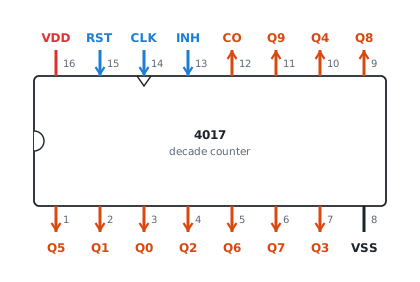
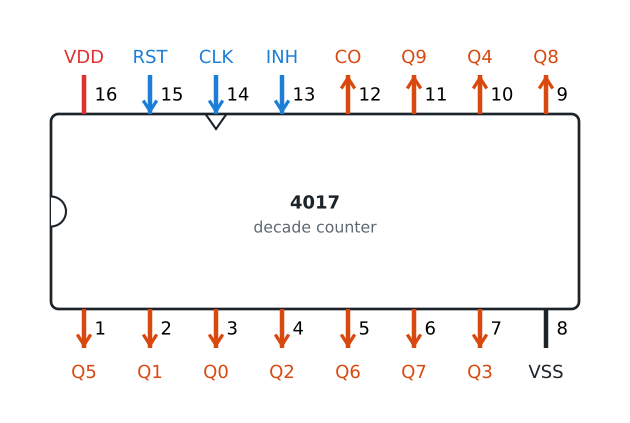
Polarity. The count advances on the rising edge of CLOCK while CLOCK INHIBIT is low. RESET is active high and asynchronous: while it is 1 the count is 0 and Q0 is high, whatever the clock does. CLOCK INHIBIT is active high: 1 holds the count.
The 4017 also counts on a falling edge of CLOCK INHIBIT while CLOCK is high: CLOCK INHIBIT gates the clock. Here it is tied to GND, so only CLOCK matters.
| Pin | Name | Direction | Function | In this circuit |
|---|---|---|---|---|
| 1 | Q5 | output | 1 in state 5, 0 otherwise | Q5 |
| 2 | Q1 | output | 1 in state 1, 0 otherwise | Q1 |
| 3 | Q0 | output | 1 in state 0, 0 otherwise | Q0 |
| 4 | Q2 | output | 1 in state 2, 0 otherwise | Q2 |
| 5 | Q6 | output | 1 in state 6, 0 otherwise | Q6 |
| 6 | Q7 | output | 1 in state 7, 0 otherwise | Q7 |
| 7 | Q3 | output | 1 in state 3, 0 otherwise | Q3 |
| 8 | VSS | power | ground, 0 V | GND |
| 9 | Q8 | output | 1 in state 8, 0 otherwise | Q8 |
| 10 | Q4 | output | 1 in state 4, 0 otherwise | Q4 |
| 11 | Q9 | output | 1 in state 9, 0 otherwise | Q9 |
| 12 | CARRY OUT | output | 1 in states 0-4, 0 in states 5-9; rises when the count goes from 9 to 0, so it can clock the next 4017 | unused |
| 13 | CLOCK INHIBIT | input | 1 holds the count; 0 lets the counter count. Active high | tied to GND |
| 14 | CLOCK | input | the count advances on the rising edge, 0 to 1 | CLK |
| 15 | RESET | input | 1 sets the count to 0 at once (Q0 = 1), without waiting for the clock. Active high | RST |
| 16 | VDD | power | supply, +5 V (3 to 18 V allowed) | +5V |
4072: dual 4-input OR
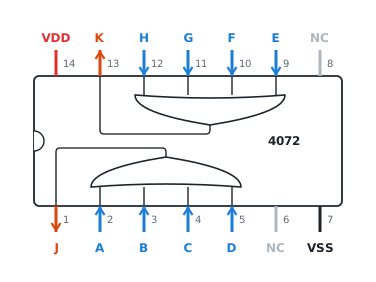
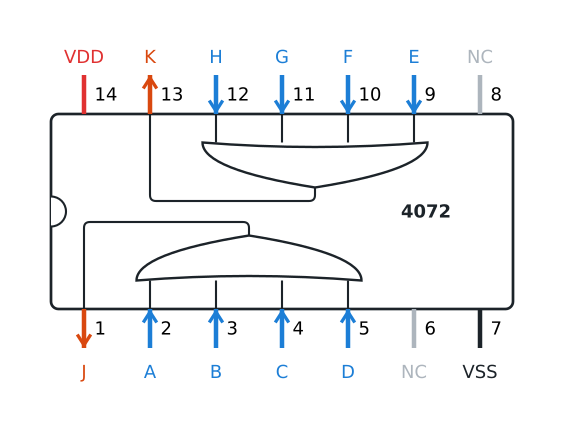
Two independent gates: pin 1 = pins 2 OR 3 OR 4 OR 5, pin 13 = pins 9 OR 10 OR 11 OR 12. Here the first gate makes red and the second green, so all eight inputs are used.
| Pin | Name | Direction | Function | In this circuit |
|---|---|---|---|---|
| 1 | J | output | J = A OR B OR C OR D | RED |
| 2 | A | input | input of the OR gate that drives pin 1 | Q3 |
| 3 | B | input | input of the OR gate that drives pin 1 | Q1 |
| 4 | C | input | input of the OR gate that drives pin 1 | Q0 |
| 5 | D | input | input of the OR gate that drives pin 1 | Q2 |
| 6 | NC | — | not connected inside the chip | not connected |
| 7 | VSS | power | ground, 0 V | GND |
| 8 | NC | — | not connected inside the chip | not connected |
| 9 | E | input | input of the OR gate that drives pin 13 | Q7 |
| 10 | F | input | input of the OR gate that drives pin 13 | Q6 |
| 11 | G | input | input of the OR gate that drives pin 13 | Q8 |
| 12 | H | input | input of the OR gate that drives pin 13 | Q9 |
| 13 | K | output | K = E OR F OR G OR H | GREEN |
| 14 | VDD | power | supply, +5 V (3 to 18 V allowed) | +5V |
4071: quad 2-input OR
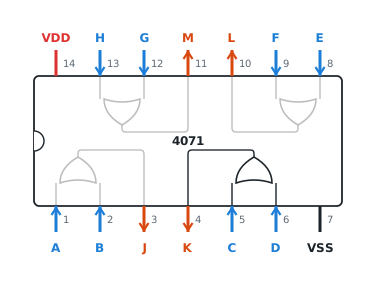
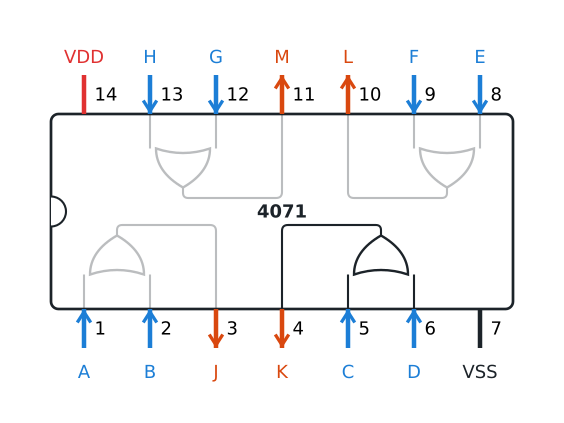
Four independent gates. Pin 4 = pin 5 OR pin 6 makes yellow from Q5 and Q4. The other three gates are not needed, but their six inputs still go to +5V or GND; their outputs stay open.
| Pin | Name | Direction | Function | In this circuit |
|---|---|---|---|---|
| 1 | A | input | input of the OR gate that drives pin 3 | tied to GND |
| 2 | B | input | input of the OR gate that drives pin 3 | tied to GND |
| 3 | J | output | J = A OR B | unused |
| 4 | K | output | K = C OR D | YELLOW |
| 5 | C | input | input of the OR gate that drives pin 4 | Q5 |
| 6 | D | input | input of the OR gate that drives pin 4 | Q4 |
| 7 | VSS | power | ground, 0 V | GND |
| 8 | E | input | input of the OR gate that drives pin 10 | tied to +5V |
| 9 | F | input | input of the OR gate that drives pin 10 | tied to +5V |
| 10 | L | output | L = E OR F | unused |
| 11 | M | output | M = G OR H | unused |
| 12 | G | input | input of the OR gate that drives pin 11 | tied to +5V |
| 13 | H | input | input of the OR gate that drives pin 11 | tied to +5V |
| 14 | VDD | power | supply, +5 V (3 to 18 V allowed) | +5V |
5Schematic 1: flip-flops and gates
traffic_light.sv describes. · SVG · PNGRead it as a state machine:
- State register. Five D flip-flops, r0 to r4, all clocked by the same edge and cleared by rst.
- Next state. Each flip-flop takes the value of its left neighbour; the first one takes the inverted value of the last. One NOT gate is all the next-state logic.
- Decoder. Ten AND gates, one per state. Each looks at two neighbouring bits, for example q2 = r1 AND NOT r2. A dot on a line means a connection; lines that cross without a dot are not connected.
- Output logic. Three OR gates.
The first three blocks are what is inside the 4017; on the breadboard you only wire the fourth.
6Schematic 2: connections between the chips
Every connection of the circuit, net by net. traffic_light_chips.sv in section 10 is written
from the same list.
| Net | From | To | Wire |
|---|---|---|---|
| CLK | 555 clock module, OUT | 4017 14 (CLK) | M-F |
| RST | reset button, OUT | 4017 15 (RST) | M-F |
| Q0 | 4017 3 (Q0) | 4072 4 (C) | M-M |
| Q1 | 4017 2 (Q1) | 4072 3 (B) | M-M |
| Q2 | 4017 4 (Q2) | 4072 5 (D) | M-M |
| Q3 | 4017 7 (Q3) | 4072 2 (A) | M-M |
| Q4 | 4017 10 (Q4) | 4071 6 (D) | M-M |
| Q5 | 4017 1 (Q5) | 4071 5 (C) | M-M |
| Q6 | 4017 5 (Q6) | 4072 10 (F) | M-M |
| Q7 | 4017 6 (Q7) | 4072 9 (E) | M-M |
| Q8 | 4017 9 (Q8) | 4072 11 (G) | M-M |
| Q9 | 4017 11 (Q9) | 4072 12 (H) | M-M |
| RED | 4072 1 (J) | traffic light R | M-F |
| YELLOW | 4071 4 (K) | traffic light Y | M-F |
| GREEN | 4072 13 (K) | traffic light G | M-F |
| +5V | +5V | 4071 14 (VDD), 4017 16 (VDD), 4072 14 (VDD); unused inputs: 4071 13 (H), 4071 12 (G), 4071 9 (F), 4071 8 (E) | |
| GND | GND | 4071 7 (VSS), 4017 8 (VSS), 4072 7 (VSS); unused inputs: 4071 1 (A), 4071 2 (B), 4017 13 (INH) | |
| not connected | 4017 12 (CO), 4071 3 (J), 4071 10 (L), 4071 11 (M), 4072 6 (NC), 4072 8 (NC) |
7Schematic 3: the breadboard
Build it step by step
- Do the getting-started steps first: how the breadboard is connected inside, the power module with both jumpers on 5 V, how a chip sits across the gap.
- Insert the chips across the gap, notch to the left: the 4071 with pin 1 in hole 12f, the 4017 with pin 1 in 22f, the 4072 with pin 1 in 33f. Check the numbers on the chips.
- Power: a red wire from pin 14 or 16 to the top + rail and a black wire from pin 7 or 8 to the bottom − rail, for each chip. Then the tie-offs of the unused inputs. Make sure no wire touches + and − at the same time.
- The eleven signal wires, in the order of the checklist below. Tick each wire as you insert it.
- The modules, with the power off: the reset button and the clock module above the board, the traffic light below it. Connect GND of the traffic light first.
- Turn the power on and set the clock module to about 1 Hz with its potentiometer.
Wiring checklist
| # | Net | From | To | |
|---|---|---|---|---|
| Power for the chips (red to +, black to −) · 6 wires | ||||
| 1 | +5V | 12a (4071 pin 14, VDD) | top + rail, column 12 | |
| 2 | GND | 18j (4071 pin 7, VSS) | bottom − rail, column 18 | |
| 3 | +5V | 22a (4017 pin 16, VDD) | top + rail, column 22 | |
| 4 | GND | 29j (4017 pin 8, VSS) | bottom − rail, column 29 | |
| 5 | +5V | 33a (4072 pin 14, VDD) | top + rail, column 33 | |
| 6 | GND | 39j (4072 pin 7, VSS) | bottom − rail, column 39 | |
| Unused inputs: CMOS inputs must not float · 7 wires | ||||
| 7 | GND | 12j (4071 pin 1, A) | bottom − rail, column 12 | |
| 8 | GND | 13j (4071 pin 2, B) | bottom − rail, column 13 | |
| 9 | +5V | 13a (4071 pin 13, H) | top + rail, column 13 | |
| 10 | +5V | 14a (4071 pin 12, G) | top + rail, column 14 | |
| 11 | +5V | 17a (4071 pin 9, F) | top + rail, column 17 | |
| 12 | +5V | 18a (4071 pin 8, E) | top + rail, column 18 | |
| 13 | GND | 25a (4017 pin 13, INH) | top − rail, column 25 | |
| Signal wires · 11 wires | ||||
| 14 | Q3 | 28g (4017 pin 7, Q3) | 34g (4072 pin 2, A) | |
| 15 | Q1 | 23h (4017 pin 2, Q1) | 35h (4072 pin 3, B) | |
| 16 | Q0 | 24i (4017 pin 3, Q0) | 36i (4072 pin 4, C) | |
| 17 | Q2 | 25j (4017 pin 4, Q2) | 37j (4072 pin 5, D) | |
| 18 | Q7 | 27j (4017 pin 6, Q7) | 38c (4072 pin 9, E) | |
| 19 | Q6 | 26g (4017 pin 5, Q6) | 37d (4072 pin 10, F) | |
| 20 | Q8 | 29c (4017 pin 9, Q8) | 36c (4072 pin 11, G) | |
| 21 | Q9 | 27d (4017 pin 11, Q9) | 35d (4072 pin 12, H) | |
| 22 | Q5 | 22i (4017 pin 1, Q5) | 16i (4071 pin 5, C) | |
| 23 | Q4 | 28c (4017 pin 10, Q4) | 17g (4071 pin 6, D) | |
| 24 | GREEN | 34b (4072 pin 13, K) | 11g | |
| Reset button and clock module above the board (male-female jumpers) · 6 wires | ||||
| 25 | +5V | reset button, + | top + rail, column 19 | |
| 26 | RST | reset button, OUT | 23a (4017 pin 15, RST) | |
| 27 | GND | reset button, − | top − rail, column 21 | |
| 28 | +5V | clock module, + | top + rail, column 28 | |
| 29 | CLK | clock module, OUT | 24a (4017 pin 14, CLK) | |
| 30 | GND | clock module, − | top − rail, column 26 | |
| Traffic-light module below the board (male-female jumpers) · 4 wires | ||||
| 31 | GREEN | traffic light, G | 11j | |
| 32 | YELLOW | traffic light, Y | 15j (4071 pin 4, K) | |
| 33 | RED | traffic light, R | 33j (4072 pin 1, J) | |
| 34 | GND | traffic light, GND | bottom − rail, column 9 | |
Test it
- The light runs red–red–red–red–yellow–yellow–green–green–green–green, one step per blink of the clock module's LED.
- Press the reset button: the light turns red at once and stays red while you hold the button. When you release it, the cycle starts with four red steps.
- Turn the potentiometer of the clock module: the whole cycle gets faster or slower, the proportions 4 : 2 : 4 stay.
If it does not work: a lamp that never lights usually means a wire one hole off; a lamp that is always on, an input of the OR gate tied to +5V by mistake. Two lamps lit at once means two outputs are joined. If the light stops, check pin 13 of the 4017 (must be GND) and pin 15 (GND when the button is not pressed). If the chips get warm, turn the power off at once and look for a short between + and −.
8SystemVerilog: the generic design
traffic_light.sv describes schematic 1: the Johnson register is the always_ff
block, the decoder is ten assign statements with AND, and the output logic is three with OR. It is
synthesizable: an FPGA or an ASIC flow turns it into five flip-flops and a few gates. The output q
shows the state, like the ten outputs of the 4017, so that the testbench and the boards can watch it.
// Exercise M11: a traffic light from a decade counter and OR gates,
// after Timofei Nikiforov's breadboard design.
//
// Generic version that matches schematic 1: five D flip-flops and gates,
// not tied to any chip.  Synthesizable.

module traffic_light
(
    input  logic       clk,
    input  logic       rst,     // 1 = go to state 0 at once, like RESET of the 4017

    output logic [9:0] q,       // q [k] = 1 in state k, like outputs Q0-Q9 of the 4017
    output logic       red,
    output logic       yellow,
    output logic       green
);

    //------------------------------------------------------------------------
    // State register: a 5-bit Johnson counter (twisted ring counter).
    // Every clock it shifts left and feeds the inverted top bit into bit 0:
    //
    // state  0     1     2     3     4     5     6     7     8     9
    // r      00000 00001 00011 00111 01111 11111 11110 11100 11000 10000
    //
    // Five flip-flops give ten states, and one bit changes per clock.

    logic [4:0] r;

    always_ff @ (posedge clk or posedge rst)
        if (rst)
            r <= '0;
        else
            r <= { r [3:0], ~ r [4] };

    //------------------------------------------------------------------------
    // Decoder: ten 2-input AND gates.  Two neighbouring bits identify each state.

    assign q [0] = ~ r [4] & ~ r [0];
    assign q [1] =   r [0] & ~ r [1];
    assign q [2] =   r [1] & ~ r [2];
    assign q [3] =   r [2] & ~ r [3];
    assign q [4] =   r [3] & ~ r [4];
    assign q [5] =   r [4] &   r [0];
    assign q [6] = ~ r [0] &   r [1];
    assign q [7] = ~ r [1] &   r [2];
    assign q [8] = ~ r [2] &   r [3];
    assign q [9] = ~ r [3] &   r [4];

    //------------------------------------------------------------------------
    // Output logic: OR gates

    assign red    = q [0] | q [1] | q [2] | q [3];  // 4 clock cycles
    assign yellow = q [4] | q [5];                  // 2 clock cycles
    assign green  = q [6] | q [7] | q [8] | q [9];  // 4 clock cycles

endmodule
{ r [3:0], ~ r [4] } is a concatenation: the lower four bits move one place up and the inverted
top bit comes in at the bottom. This one line is the shift register with its NOT gate.
9SystemVerilog models of the chips
One module per chip, with ports named as in the datasheet and the pin number of each port in a comment. All three models are synthesizable. The models leave out the power pins: in SystemVerilog a wire simply has the value 0 or 1.
// CD4017B: CMOS decade counter with 10 decoded outputs.
//
// Model of the chip as seen at its pins.  The power pins, VDD (16) and VSS (8),
// are left out.  Synthesizable.
//
// The chip counts on a rising edge of CLOCK while CLOCK INHIBIT is low, and
// also on a falling edge of CLOCK INHIBIT while CLOCK is high: CLOCK INHIBIT
// gates the clock.  The model does the same with an AND gate in the clock path.
// In an FPGA design keep clock_inhibit at 0; then the gate is just a wire.
//
// Inside, the counter is a 5-stage Johnson counter with a decoder, the same
// circuit as traffic_light.sv.  The real chip also has extra gates that bring
// the counter into the ten-state sequence from any state after power-up;
// the model needs a reset instead.

module cd4017
(
    input  logic       clock,          // Pin 14
    input  logic       clock_inhibit,  // Pin 13: 1 = hold the count
    input  logic       reset,          // Pin 15: 1 = count 0 (Q0 = 1) at once

    output logic [9:0] q,              // Pins 3 2 4 7 10 1 5 6 9 11 = Q0 ... Q9
    output logic       carry_out       // Pin 12: 1 for counts 0-4, 0 for counts 5-9
);

    wire gated_clock = clock & ~ clock_inhibit;

    logic [4:0] r;

    always_ff @ (posedge gated_clock or posedge reset)
        if (reset)
            r <= '0;
        else
            r <= { r [3:0], ~ r [4] };

    assign q [0] = ~ r [4] & ~ r [0];
    assign q [1] =   r [0] & ~ r [1];
    assign q [2] =   r [1] & ~ r [2];
    assign q [3] =   r [2] & ~ r [3];
    assign q [4] =   r [3] & ~ r [4];
    assign q [5] =   r [4] &   r [0];
    assign q [6] = ~ r [0] &   r [1];
    assign q [7] = ~ r [1] &   r [2];
    assign q [8] = ~ r [2] &   r [3];
    assign q [9] = ~ r [3] &   r [4];

    assign carry_out = ~ r [4];

endmodule
The 4017 model has one detail you may not expect: gated_clock. The real chip counts on the
rising edge of CLOCK while CLOCK INHIBIT is low, and also on the falling edge of CLOCK INHIBIT while CLOCK is high;
an AND gate in the clock path does exactly that. On an FPGA, clocks should not pass through gates, so keep
clock_inhibit at 0; synthesis then removes the gate. The real chip also recovers from any state at
power-up; the model needs a reset.
// CD4071B: quad 2-input OR gate.
//
// Ports in pin order, named as in the datasheet.  The power pins, VSS (7)
// and VDD (14), are left out.  Synthesizable.

module cd4071
(
    input  logic a,  // Pin 1
    input  logic b,  // Pin 2
    output logic j,  // Pin 3:  j = a | b
    output logic k,  // Pin 4:  k = c | d
    input  logic c,  // Pin 5
    input  logic d,  // Pin 6
                     // Pin 7:  VSS
    input  logic e,  // Pin 8
    input  logic f,  // Pin 9
    output logic l,  // Pin 10: l = e | f
    output logic m,  // Pin 11: m = g | h
    input  logic g,  // Pin 12
    input  logic h   // Pin 13
                     // Pin 14: VDD
);

    assign j = a | b;
    assign k = c | d;
    assign l = e | f;
    assign m = g | h;

endmodule
// CD4072B: dual 4-input OR gate.
//
// Ports in pin order, named as in the datasheet.  The power pins, VSS (7)
// and VDD (14), are left out, and so are the unconnected pins 6 and 8.
// Synthesizable.

module cd4072
(
    output logic j,  // Pin 1:  j = a | b | c | d
    input  logic a,  // Pin 2
    input  logic b,  // Pin 3
    input  logic c,  // Pin 4
    input  logic d,  // Pin 5
                     // Pin 6:  not connected
                     // Pin 7:  VSS
                     // Pin 8:  not connected
    input  logic e,  // Pin 9
    input  logic f,  // Pin 10
    input  logic g,  // Pin 11
    input  logic h,  // Pin 12
    output logic k   // Pin 13: k = e | f | g | h
                     // Pin 14: VDD
);

    assign j = a | b | c | d;
    assign k = e | f | g | h;

endmodule
10SystemVerilog: the chip-level design
traffic_light_chips.sv connects the chip models exactly as schematic 2 and the breadboard
connect the chips, with the same ports as traffic_light.sv. Unused inputs are tied to
vdd or gnd as on the breadboard, and unused outputs go to wires named
unused_…. The file is generated from the breadboard wire list after a pin-level check of that list,
so the code, the drawings and the checklist cannot disagree.
// Exercise M11, chip-level version: the chips and wires of schematic 2 and
// of the breadboard.  Same ports as traffic_light.sv.
//
// Generated by tools/bb_m11.py from the checked breadboard wire list;
// change the wire list there, not this file.  Synthesizable.

module traffic_light_chips
(
    input  logic       clk,
    input  logic       rst,

    output logic [9:0] q,
    output logic       red,
    output logic       yellow,
    output logic       green
);

    // The power rails of the breadboard, for tied-off inputs

    wire gnd = 1'b0;
    wire vdd = 1'b1;

    // Outputs that go nowhere

    wire unused_4071_j;
    wire unused_4071_l;
    wire unused_4071_m;
    wire unused_4017_carry_out;

    //------------------------------------------------------------------------

    // CD4071 quad 2-input OR, pin 1 in column 12

    cd4071 i_4071
    (
        .a ( gnd           ),  // Pin 1 <- GND, unused input
        .b ( gnd           ),  // Pin 2 <- GND, unused input
        .j ( unused_4071_j ),  // Pin 3, unused output
        .k ( yellow        ),  // Pin 4 -> traffic light Y
        .c ( q [5]         ),  // Pin 5 <- 4017 pin 1 (Q5)
        .d ( q [4]         ),  // Pin 6 <- 4017 pin 10 (Q4)
        .e ( vdd           ),  // Pin 8 <- +5V, unused input
        .f ( vdd           ),  // Pin 9 <- +5V, unused input
        .l ( unused_4071_l ),  // Pin 10, unused output
        .m ( unused_4071_m ),  // Pin 11, unused output
        .g ( vdd           ),  // Pin 12 <- +5V, unused input
        .h ( vdd           )   // Pin 13 <- +5V, unused input
    );

    //------------------------------------------------------------------------

    // CD4017 decade counter, pin 1 in column 22

    cd4017 i_4017
    (
        .clock         ( clk                   ),  // Pin 14 <- the 555 clock module
        .clock_inhibit ( gnd                   ),  // Pin 13 <- GND
        .reset         ( rst                   ),  // Pin 15 <- the reset button
        .q             ( q                     ),  // Pins 3 2 4 7 10 1 5 6 9 11 = Q0 ... Q9
        .carry_out     ( unused_4017_carry_out )   // Pin 12, unused output
    );

    //------------------------------------------------------------------------

    // CD4072 dual 4-input OR, pin 1 in column 33

    cd4072 i_4072
    (
        .j ( red   ),  // Pin 1 -> traffic light R
        .a ( q [3] ),  // Pin 2 <- 4017 pin 7 (Q3)
        .b ( q [1] ),  // Pin 3 <- 4017 pin 2 (Q1)
        .c ( q [0] ),  // Pin 4 <- 4017 pin 3 (Q0)
        .d ( q [2] ),  // Pin 5 <- 4017 pin 4 (Q2)
        .e ( q [7] ),  // Pin 9 <- 4017 pin 6 (Q7)
        .f ( q [6] ),  // Pin 10 <- 4017 pin 5 (Q6)
        .g ( q [8] ),  // Pin 11 <- 4017 pin 9 (Q8)
        .h ( q [9] ),  // Pin 12 <- 4017 pin 11 (Q9)
        .k ( green )   // Pin 13 -> traffic light G
    );

endmodule
11Testbench and simulation scripts
tb.sv runs both designs side by side from the same clock and reset and compares them with a
reference model: a state number from 0 to 9 and the colour that belongs to it. It checks at every falling
clock edge, half a period after the state has changed, and also tests an asynchronous reset in the middle of a
state. At the end it counts the clock periods of each colour after a reset and prints
PASS or FAIL.
tb.sv192 lines · show the codefile
// Testbench for exercise M11.
//
// Runs the generic design (traffic_light.sv) and the chip-level design
// (traffic_light_chips.sv) side by side and compares both with a reference
// model: a state number from 0 to 9 and the colour that belongs to it.
// Works with Icarus Verilog, Verilator (--binary) and Questa.

module tb;

    logic       clk;
    logic       rst;

    logic [9:0] q,      q_chips;
    logic       red,    red_chips;
    logic       yellow, yellow_chips;
    logic       green,  green_chips;

    traffic_light i_generic
    (
        .clk    ( clk    ),
        .rst    ( rst    ),
        .q      ( q      ),
        .red    ( red    ),
        .yellow ( yellow ),
        .green  ( green  )
    );

    traffic_light_chips i_chips
    (
        .clk    ( clk          ),
        .rst    ( rst          ),
        .q      ( q_chips      ),
        .red    ( red_chips    ),
        .yellow ( yellow_chips ),
        .green  ( green_chips  )
    );

    //------------------------------------------------------------------------
    // Clock with a period of 10 time units.
    // On the breadboard one period is about a second.

    initial
    begin
        clk = 1'b0;

        forever
            # 5 clk = ~ clk;
    end

    //------------------------------------------------------------------------
    // Reference model: the number of the state

    logic [3:0] state;

    always @ (posedge clk or posedge rst)
        if (rst)
            state <= 4'd0;
        else if (state == 4'd9)
            state <= 4'd0;
        else
            state <= state + 4'd1;

    wire [9:0] q_expected      = 10'b1 << state;
    wire       red_expected    = state <= 4'd3;
    wire       yellow_expected = state == 4'd4 || state == 4'd5;
    wire       green_expected  = state >= 4'd6;

    //------------------------------------------------------------------------
    // Checks at every falling edge, half a period after the state changes

    int cycle, n_checks, n_errors;

    function automatic string light_name (input logic r, input logic y, input logic g);
        case ({ r, y, g })
        3'b100:  return "red   ";
        3'b010:  return "yellow";
        3'b001:  return "green ";
        3'b000:  return "dark  ";
        default: return "mixed ";
        endcase
    endfunction

    function automatic logic is_correct
    (
        input logic [9:0] q_actual,
        input logic       r,
        input logic       y,
        input logic       g
    );
        return    q_actual === q_expected
               && r        === red_expected
               && y        === yellow_expected
               && g        === green_expected;
    endfunction

    // Clock cycles of each colour during the first full period after reset

    int n_red, n_yellow, n_green, n_period;

    initial
    begin
        cycle    = 0;
        n_checks = 0;
        n_errors = 0;
        n_red    = 0;
        n_yellow = 0;
        n_green  = 0;
        n_period = 0;

        forever
        begin
            logic ok_generic, ok_chips;

            @ (negedge clk);
            cycle ++;

            ok_generic = is_correct (q,       red,       yellow,       green);
            ok_chips   = is_correct (q_chips, red_chips, yellow_chips, green_chips);

            n_checks += 2;

            if (! ok_generic)
                n_errors ++;

            if (! ok_chips)
                n_errors ++;

            $display ("%5d  %b    %b  %s  %s  %s",
                cycle, rst, q, light_name (red, yellow, green),
                ok_generic ? "ok     " : "WRONG  ", ok_chips ? "ok" : "WRONG");

            if (! rst && n_period < 10)
            begin
                n_period ++;

                if (red)
                    n_red ++;

                if (yellow)
                    n_yellow ++;

                if (green)
                    n_green ++;
            end
        end
    end

    //------------------------------------------------------------------------
    // Stimulus

    initial
    begin
        $dumpfile ("tb.vcd");

        `ifdef __ICARUS__
            $dumpvars (0, tb);  // Without a scope Icarus also tries to dump $unit
        `else
            $dumpvars;
        `endif

        $display ("cycle  rst  Q9..Q0      light   generic  chips");

        // Reset at the start, released between two clock edges

        rst = 1'b1;
        # 12 rst = 1'b0;

        repeat (24) @ (posedge clk);

        // Reset in the middle of a state: both designs go to state 0 at once,
        // without waiting for the clock, like RESET of the 4017

        # 2 rst = 1'b1;
        repeat (2) @ (posedge clk);
        # 7 rst = 1'b0;

        repeat (12) @ (posedge clk);
        @ (negedge clk);
        # 1;  // Let the last check print first

        $display ("One period after reset: red %0d, yellow %0d, green %0d clock cycles",
            n_red, n_yellow, n_green);

        if (n_errors == 0 && n_red == 4 && n_yellow == 2 && n_green == 4)
            $display ("PASS: %0d checks, no errors", n_checks);
        else
            $display ("FAIL: %0d errors in %0d checks", n_errors, n_checks);

        $finish;
    end

endmodule
Each script compiles the six files, runs the simulation, writes a log and the waveform tb.vcd,
and exits with an error unless the test passes. Run them from any directory:
./run_icarus.bash, ./run_verilator.bash or ./run_questa.bash;
./clean.bash removes what they make. The waveform opens in
GTKWave or Surfer.
run_icarus.bash22 lines · show the codefile
#!/usr/bin/env bash

# Exercise M11: run the testbench with Icarus Verilog 12 or later.
# The output goes to icarus.log and the waveform to tb.vcd,
# for GTKWave or Surfer.

set -Eeuo pipefail

cd "$(dirname "$0")"

files=(tb.sv traffic_light.sv traffic_light_chips.sv cd4017.sv cd4071.sv cd4072.sv)

if ! command -v iverilog > /dev/null
then
    printf '%s\n' "$0: iverilog not found, install Icarus Verilog 12 or later" >&2
    exit 1
fi

iverilog -g2012 -o tb.vvp "${files[@]}"
vvp -n tb.vvp | tee icarus.log

grep -q '^PASS' icarus.log
run_verilator.bash29 lines · show the codefile
#!/usr/bin/env bash

# Exercise M11: run the testbench with Verilator 5.  --binary builds
# a simulator with the testbench's delays; it needs a C++20 compiler.
# The output goes to verilator.log and the waveform to tb.vcd.

set -Eeuo pipefail

cd "$(dirname "$0")"

files=(tb.sv traffic_light.sv traffic_light_chips.sv cd4017.sv cd4071.sv cd4072.sv)

# OSS CAD Suite unpacked in the home directory has Verilator too

if ! command -v verilator > /dev/null && [ -x "$HOME/oss-cad-suite/bin/verilator" ]
then
    PATH="$HOME/oss-cad-suite/bin:$PATH"
fi

if ! command -v verilator > /dev/null
then
    printf '%s\n' "$0: verilator not found, install Verilator 5" >&2
    exit 1
fi

verilator --binary -Wall --trace --top-module tb -o tb "${files[@]}"
obj_dir/tb | tee verilator.log

grep -q '^PASS' verilator.log
run_questa.bash64 lines · show the codefile
#!/usr/bin/env bash

# Exercise M11: run the testbench with Questa, for example the free
# Questa Starter Edition that comes with Quartus Prime Lite.
# The output goes to questa.log and the waveform to tb.vcd.

set -Eeuo pipefail

cd "$(dirname "$0")"

files=(tb.sv traffic_light.sv traffic_light_chips.sv cd4017.sv cd4071.sv cd4072.sv)

# When vsim is not in PATH, look for it where Quartus installs it

if ! command -v vsim > /dev/null
then
    for dir in "$HOME"/intelFPGA_lite/*/questa_fse/bin  \
               "$HOME"/altera_lite/*/questa_fse/bin     \
               /opt/intelFPGA_lite/*/questa_fse/bin     \
               /opt/altera_lite/*/questa_fse/bin
    do
        if [ -x "$dir/vsim" ]
        then
            PATH="$dir:$PATH"
            break
        fi
    done
fi

if ! command -v vsim > /dev/null
then
    printf '%s\n' "$0: vsim not found, install Questa or add it to PATH" >&2
    exit 1
fi

# The Starter Edition needs a free license file from the Intel
# licensing site; Quartus keeps it in ~/flexlm/license.dat

license="$HOME/flexlm/license.dat"

# ${SALT_LICENSE_SERVER-} is empty when the variable is not set,
# where a plain $SALT_LICENSE_SERVER would stop the script (set -u)
salt_license="${SALT_LICENSE_SERVER-}"

if [ -z "$salt_license" ] && [ -f "$license" ]
then
    export SALT_LICENSE_SERVER="$license"
fi

# Older Questa versions read LM_LICENSE_FILE; ${LM_LICENSE_FILE-}
# is empty when the variable is not set
lm_license="${LM_LICENSE_FILE-}"

if [ -z "$lm_license" ] && [ -f "$license" ]
then
    export LM_LICENSE_FILE="$license"
fi

rm -rf work
vlib work > /dev/null
vlog -sv -lint "${files[@]}"
vsim -c tb -do "run -all; quit -f" | tee questa.log

grep -q 'PASS' questa.log
Tested with Icarus Verilog 12.0 and 14.0 (development), Verilator 5.053 with -Wall and no
warnings, and Questa Altera Starter FPGA Edition 2025.2 from Quartus Prime Lite 25.1. The code uses only what Icarus Verilog 13 supports.
This is the output, from Icarus Verilog:
VCD info: dumpfile tb.vcd opened for output.
cycle  rst  Q9..Q0      light   generic  chips
    1  1    0000000001  red     ok          ok
    2  0    0000000010  red     ok          ok
    3  0    0000000100  red     ok          ok
    4  0    0000001000  red     ok          ok
    5  0    0000010000  yellow  ok          ok
    6  0    0000100000  yellow  ok          ok
    7  0    0001000000  green   ok          ok
    8  0    0010000000  green   ok          ok
    9  0    0100000000  green   ok          ok
   10  0    1000000000  green   ok          ok
   11  0    0000000001  red     ok          ok
   12  0    0000000010  red     ok          ok
   13  0    0000000100  red     ok          ok
   14  0    0000001000  red     ok          ok
   15  0    0000010000  yellow  ok          ok
   16  0    0000100000  yellow  ok          ok
   17  0    0001000000  green   ok          ok
   18  0    0010000000  green   ok          ok
   19  0    0100000000  green   ok          ok
   20  0    1000000000  green   ok          ok
   21  0    0000000001  red     ok          ok
   22  0    0000000010  red     ok          ok
   23  0    0000000100  red     ok          ok
   24  0    0000001000  red     ok          ok
   25  1    0000000001  red     ok          ok
   26  1    0000000001  red     ok          ok
   27  1    0000000001  red     ok          ok
   28  0    0000000010  red     ok          ok
   29  0    0000000100  red     ok          ok
   30  0    0000001000  red     ok          ok
   31  0    0000010000  yellow  ok          ok
   32  0    0000100000  yellow  ok          ok
   33  0    0001000000  green   ok          ok
   34  0    0010000000  green   ok          ok
   35  0    0100000000  green   ok          ok
   36  0    1000000000  green   ok          ok
   37  0    0000000001  red     ok          ok
   38  0    0000000010  red     ok          ok
   39  0    0000000100  red     ok          ok
One period after reset: red 4, yellow 2, green 4 clock cycles
PASS: 78 checks, no errors
tb.sv:189: $finish called at 391 (1s)
To see that the testbench really catches mistakes, break something and run it again: connect pin 2 of the
4072 to q [4] instead of q [3] in traffic_light_chips.sv, or change one
decoder line in traffic_light.sv. The script reports FAIL and the trace shows the
lines marked WRONG.
12On an FPGA board: lab_top in BGM
The Basics-Graphics-Music (BGM)
repository runs the same labs on dozens of FPGA boards. Each lab has a lab_top module with the
same ports on every board: clock, a 1 Hz slow_clk, reset, keys, LEDs, a 7-segment display.
- Copy a lab, for example
labs/1_basics/1_06_binary_counter, to a new directory such aslabs/1_basics/1_11_traffic_light. - Replace its
lab_top.svwithbgm_lab/lab_top.svfrom this exercise and addtraffic_light.sv. The BGM scripts compile every.svfile of the directory excepttb.sv. - Run
./03_synthesize_for_fpga.bashand./04_configure_fpga.bash; the first run asks which board you have.
The traffic light runs from slow_clk, which every BGM board makes at 1 Hz, so it steps once a
second like the breadboard. BGM makes it in peripherals/slow_clk_gen.sv: a counter on the board clock
toggles a flip-flop, and on AMD (Xilinx) and Intel (Altera) FPGAs a BUFG or global
primitive puts that signal on the FPGA clock network, so it reaches all flip-flops like a real clock. The rightmost digit of the display is a small traffic light: segment a (top) is red,
g (middle) yellow, d (bottom) green. The LEDs show the state as a running light. To run the chip-level design
instead, add traffic_light_chips.sv and the three chip models and change the module name in the
instance.
bgm_lab/lab_top.sv117 lines · show the codefile
// Exercise M11 on an FPGA board with the Basics-Graphics-Music (BGM) labs:
// https://github.com/yuri-panchul/basics-graphics-music
//
// Copy a lab directory, for example labs/1_basics/1_06_binary_counter,
// replace its lab_top.sv with this file and add traffic_light.sv.
// For the chip-level design add traffic_light_chips.sv, cd4017.sv, cd4071.sv
// and cd4072.sv instead, and change the module name below.
//
// The traffic light runs from slow_clk, the 1 Hz clock that every BGM board
// wrapper makes, so it changes state once a second, like the breadboard with
// the 555 module.  Reset is the reset button of the board.
// The 7-segment display shows the light: segment a red, g yellow, d green.
// The LEDs show the state as a running light.

`include "config.svh"

module lab_top
# (
    parameter  clk_mhz       = 50,
               w_key         = 4,
               w_sw          = 8,
               w_led         = 8,
               w_digit       = 8,
               w_gpio        = 100,

               screen_width  = 640,
               screen_height = 480,

               w_red         = 4,
               w_green       = 4,
               w_blue        = 4,

               w_x           = $clog2 ( screen_width  ),
               w_y           = $clog2 ( screen_height )
)
(
    input                        clk,
    input                        slow_clk,
    input                        rst,

    // Keys, switches, LEDs

    input        [w_key   - 1:0] key,
    input        [w_sw    - 1:0] sw,
    output logic [w_led   - 1:0] led,

    // A dynamic seven-segment display

    output logic [          7:0] abcdefgh,
    output logic [w_digit - 1:0] digit,

    // Graphics

    input        [w_x     - 1:0] x,
    input        [w_y     - 1:0] y,

    output logic [w_red   - 1:0] red,
    output logic [w_green - 1:0] green,
    output logic [w_blue  - 1:0] blue,

    // Microphone, sound output and UART

    input        [         23:0] mic,
    output       [         15:0] sound,

    input                        uart_rx,
    output                       uart_tx,

    // General-purpose Input/Output

    inout        [w_gpio  - 1:0] gpio
);

    //------------------------------------------------------------------------

       assign red        = '0;
       assign green      = '0;
       assign blue       = '0;
       assign sound      = '0;
       assign uart_tx    = '1;

    //------------------------------------------------------------------------

    // lab_top already has ports named red and green (the screen colours),
    // so the lights get other names here

    logic [9:0] q;
    logic       light_red, light_yellow, light_green;

    traffic_light i_traffic_light
    (
        .clk    ( slow_clk     ),
        .rst    ( rst          ),
        .q      ( q            ),
        .red    ( light_red    ),
        .yellow ( light_yellow ),
        .green  ( light_green  )
    );

    //------------------------------------------------------------------------

    //   --a--
    //  |     |
    //  f     b
    //  |     |
    //   --g--
    //  |     |
    //  e     c
    //  |     |
    //   --d--  h

    assign abcdefgh = { light_red, 2'b0, light_green, 2'b0, light_yellow, 1'b0 };
    assign digit    = w_digit' (1);

    assign led      = w_led' (q);

endmodule
13On an FPGA board: hackathon_top in BGM
The hackathon setup of BGM uses a Tang Nano 9K with a 480×272 screen and a TM1638 board of keys, LEDs and
digits. Its top module, hackathon_top, has simpler ports; the first line of the file names the
board, so the scripts need no questions.
- Copy a directory such as
hackathon/problems/4_binary_counter. - Replace its
hackathon_top.svwithbgm_hackathon/hackathon_top.svand addtraffic_light.sv. - Run
./03_synthesize_for_fpga.bashand./04_configure_fpga.bash.
The screen shows a traffic light: three round lamps in a dark box, bright when on and dim when off. The
rightmost digit shows the same three segments as in lab_top, and the eight LEDs show states 0–7.
The screen colour ports are called red and green, so the lights are called
light_red, light_yellow and light_green here.
bgm_hackathon/hackathon_top.sv112 lines · show the codefile
// Board configuration: tang_nano_9k_lcd_480_272_tm1638_hackathon
// This module uses few parameterization and relaxed typing rules

// Exercise M11 in the hackathon setup of Basics-Graphics-Music (BGM):
// https://github.com/yuri-panchul/basics-graphics-music
//
// Copy a directory such as hackathon/problems/4_binary_counter, replace its
// hackathon_top.sv with this file and add traffic_light.sv.
//
// The traffic light runs from slow_clock, one beat per second, like the
// breadboard with the 555 module.  The screen shows a traffic light,
// the 7-segment display shows it too (segment a red, g yellow, d green),
// and the eight LEDs show states 0-7 as a running light.

module hackathon_top
(
    input  logic       clock,
    input  logic       slow_clock,
    input  logic       reset,

    input  logic [7:0] key,
    output logic [7:0] led,

    // A dynamic seven-segment display

    output logic [7:0] abcdefgh,
    output logic [7:0] digit,

    // LCD screen interface

    input  logic [8:0] x,
    input  logic [8:0] y,

    output logic [4:0] red,
    output logic [5:0] green,
    output logic [4:0] blue,

    inout  logic [3:0] gpio
);

    //------------------------------------------------------------------------
    // The screen colours are called red and green already,
    // so the lights get other names

    logic [9:0] q;
    logic       light_red, light_yellow, light_green;

    traffic_light i_traffic_light
    (
        .clk    ( slow_clock   ),
        .rst    ( reset        ),
        .q      ( q            ),
        .red    ( light_red    ),
        .yellow ( light_yellow ),
        .green  ( light_green  )
    );

    assign led      = q [7:0];

    assign abcdefgh = { light_red, 2'b0, light_green, 2'b0, light_yellow, 1'b0 };
    assign digit    = 8'b0000_0001;

    //------------------------------------------------------------------------
    // A traffic light on the 480 x 272 screen: three round lamps in a dark box.
    // dx is the distance from the middle of the screen, dy1-dy3 the distances
    // from the centres of the lamps, so a lamp is where dx * dx + dy * dy < 34 * 34.

    wire [8:0] dx  = x > 240 ? x - 240 : 240 - x;
    wire [8:0] dy1 = y > 56  ? y - 56  : 56  - y;
    wire [8:0] dy2 = y > 136 ? y - 136 : 136 - y;
    wire [8:0] dy3 = y > 216 ? y - 216 : 216 - y;

    wire lamp1 = dx * dx + dy1 * dy1 < 34 * 34;
    wire lamp2 = dx * dx + dy2 * dy2 < 34 * 34;
    wire lamp3 = dx * dx + dy3 * dy3 < 34 * 34;

    always_comb
    begin
        red   = 0;
        green = 0;
        blue  = 0;

        if (x >= 196 & x < 284 & y >= 12 & y < 260)
        begin
            red   = 3;
            green = 6;
            blue  = 3;
        end

        if (lamp1)
        begin
            red   = light_red ? 31 : 7;
            green = 0;
            blue  = 0;
        end

        if (lamp2)
        begin
            red   = light_yellow ? 31 : 7;
            green = light_yellow ? 50 : 11;
            blue  = 0;
        end

        if (lamp3)
        begin
            red   = 0;
            green = light_green ? 63 : 14;
            blue  = light_green ? 8  : 2;
        end
    end

endmodule
14On a chip: Tiny Tapeout
Tiny Tapeout makes real chips from student designs. Each design is a
module with the ports below; on the demo board ui_in comes from DIP switches and
uo_out drives a 7-segment display.
The demo board makes the project clock itself and can set it anywhere from 1 Hz to 66.5 MHz (see
Clock in the Tiny Tapeout docs). Set it to 1 Hz, and
project.v connects clk straight to the traffic light, just as the 555 module clocks the
4017 on the breadboard. The display shows the light on segments a, g and d.
tiny_tapeout/project.v54 lines · show the codefile
/*
 * Exercise M11 on Tiny Tapeout: Timofei's traffic light on the 7-segment
 * display of the demo board.
 *
 * Add traffic_light.sv to source_files in info.yaml next to project.v.
 * Rename the module to tt_um_<your GitHub name>_<project name> and use the
 * same name as top_module in info.yaml.
 */

`default_nettype none

module tt_um_example (
    input  wire [7:0] ui_in,    // DIP switches, INPUT Pmod, RP2350 GPIO17-24
    output wire [7:0] uo_out,   // 7-segment display, OUTPUT Pmod, RP2350 GPIO33-40
    input  wire [7:0] uio_in,   // BIDIR Pmod, RP2350 GPIO25-32
    output wire [7:0] uio_out,  //   (same pins)
    output wire [7:0] uio_oe,   //   1 = your design drives the pin
    input  wire       ena,      // set by the on-chip project mux, not a board pin
    input  wire       clk,      // RP2350 GPIO16
    input  wire       rst_n     // RP2350 GPIO14
);

    // The light should change about once a second.  The demo board makes
    // clk itself and can set it anywhere from 1 Hz to 66.5 MHz, so set the
    // project clock to 1 Hz (clock_hz: 1 in info.yaml) and clk drives the
    // traffic light directly.  Do not make a slow clock from a counter in an
    // ASIC: keep one clock and use a clock enable when you need a slow tick.

    wire [9:0] q;
    wire       red, yellow, green;

    traffic_light i_traffic_light (
        .clk    ( clk      ),
        .rst    ( ~ rst_n  ),
        .q      ( q        ),
        .red    ( red      ),
        .yellow ( yellow   ),
        .green  ( green    )
    );

    // 7-segment display: uo_out [0] is segment a, ..., uo_out [6] is g,
    // uo_out [7] is the dot.  Segment a (top) is red, g (middle) yellow,
    // d (bottom) green.

    assign uo_out  = { 1'b0, yellow, 2'b0, green, 2'b0, red };

    assign uio_out = 8'b0;
    assign uio_oe  = 8'b0;

    // List all unused inputs to prevent warnings

    wire _unused = & { ena, ui_in, uio_in, q, 1'b0 };

endmodule
In info.yaml set the clock to 1 Hz, list both files and use the module name as the top
module:
project:
  clock_hz:   1                 # the demo board makes a 1 Hz clock
  top_module: "tt_um_example"   # rename to tt_um_<your GitHub name>_traffic_light
  source_files:
    - "project.v"
    - "traffic_light.sv"
slow_clk with a counter, but on AMD
and Intel FPGAs it routes that signal onto the clock network with BUFG or global
(section 12), and some production FPGA designs do the same. In an ASIC a counter bit used as a
clock is bad practice: it is a second clock with its own clock tree, its edges come later than those of
clk by a delay nobody controls, the timing tools must be told about it, and every signal between the
two clocks crosses clock domains. Here the board makes the 1 Hz clock, so no divider is needed. When a chip
needs a slow tick from a fast clock, keep one clock and add a clock enable (a task in
section 15).15Going further
Tasks for students
- Other timings. Red 5, yellow 1, green 4: which wires move? (Q4 joins the red gate, which already has four inputs, so you need one more gate of the 4071.)
- A shorter ring. Wire Q8 to RESET instead of the button. The counter now runs S0–S7 and restarts: what are the colours now? Why does the 4017 show S8 for a few nanoseconds?
- A longer ring. CARRY OUT rises every ten clocks. Clock a second 4017 from it and make a light whose red lasts 40 clocks.
- Red and yellow together, as in Germany or the UK: red, red + yellow, green, yellow. Which states feed which gate, and how many 4-input gates do you need?
- A pedestrian light with a second traffic-light module: walk while the cars have red.
- A clock enable. Add an input
entotraffic_light.svso that the state changes only on the clock edges whereen= 1. Inproject.v, run the project clock at 10 MHz and makeena pulse one clock long every 10 000 000 clocks with a counter. The light still changes once a second, but the whole chip runs on one clock: this is how a slow tick is made in an ASIC. What must change in the testbench? - In SystemVerilog: write the same machine with an
enumstate and acase, or as a one-hot ring of ten flip-flops, and compare the cells that synthesis gives for each. The testbench checks any version with the same ports.
A shortcut that the chip hides
With the Johnson register visible, the decoder and the OR gates shrink to three 2-input gates: red is states
0–3, which is exactly ~ r [3] & ~ r [4]; yellow is r [3] & r [0]; green is
r [4] & ~ r [0]. Check them in the state table of section 2. The 4017 cannot do this because its
Johnson bits stay inside the chip, but in an FPGA it is a free optimization, and synthesis tools find such things
on their own.
Related designs
The 555-and-4017 traffic light has been built for decades, mostly with diodes. A few versions to compare:
- Traffic Light Project on John Hewes's Electronics Club site: a 555 clocks a 4017, diodes combine the outputs for amber and green, and red comes from CARRY OUT. It runs the British sequence: red, red + amber, green, amber.
- Traffic Lights For A Model Intersection, Silicon Chip, May 1997: two streets from one 4017 with “a diode gating system”.
- A student traffic light controller (about 2014) with a CD4017, a 4072 and a 7432: OR gates, as in this exercise.
Files of this exercise
- traffic_light.sv: the generic design (section 8)
- cd4017.sv, cd4071.sv, cd4072.sv: chip models (section 9)
- traffic_light_chips.sv: the chip-level design (section 10)
- tb.sv and run_icarus.bash, run_verilator.bash, run_questa.bash, clean.bash (section 11)
- bgm_lab/lab_top.sv, bgm_hackathon/hackathon_top.sv, tiny_tapeout/project.v (sections 12–14)
- Drawings as SVG and PNG in images/: the three schematics, the pinouts, the state
diagram and the waveforms; the Russian versions end in
_ru
Sources
Timofei Nikiforov's circuit is described in the Habr article about the electronics course (lesson 1.7) and in “Teaching children electronics is due for a major redesign”, picture 15. The 4017, 4071 and 4072 are described in the Texas Instruments datasheets for the CD4017B, CD4071B and CD4072B.